

Prerequisites
- You know your way around a block explorer. If not, read Block Explorers first.
- You have deployed a contract, for example the
SimpleStorage.solfrom the earlier tutorials.
Method 1: Subscan Verification
Subscan is peaq’s block explorer, and a contract verified there shows decoded method names and parameters on every transaction.1. Prepare Metadata from Remix
Open the Remix IDE workspace you used to deploySimpleStorage.sol, then:
- Open the
artifacts/build-info/hex_valuefile. It holds the content you move intoSimpleStorage_metadata.json.
- Copy the entire
contentline, as shown in the screenshot above.
2. Paste content into SimpleStorage_metadata
- Open the
SimpleStorage_metadata.jsonfile. - Find the
sourcesobject where the data for contractSimpleStorage.solis stored. - Paste the content after the
licensefield.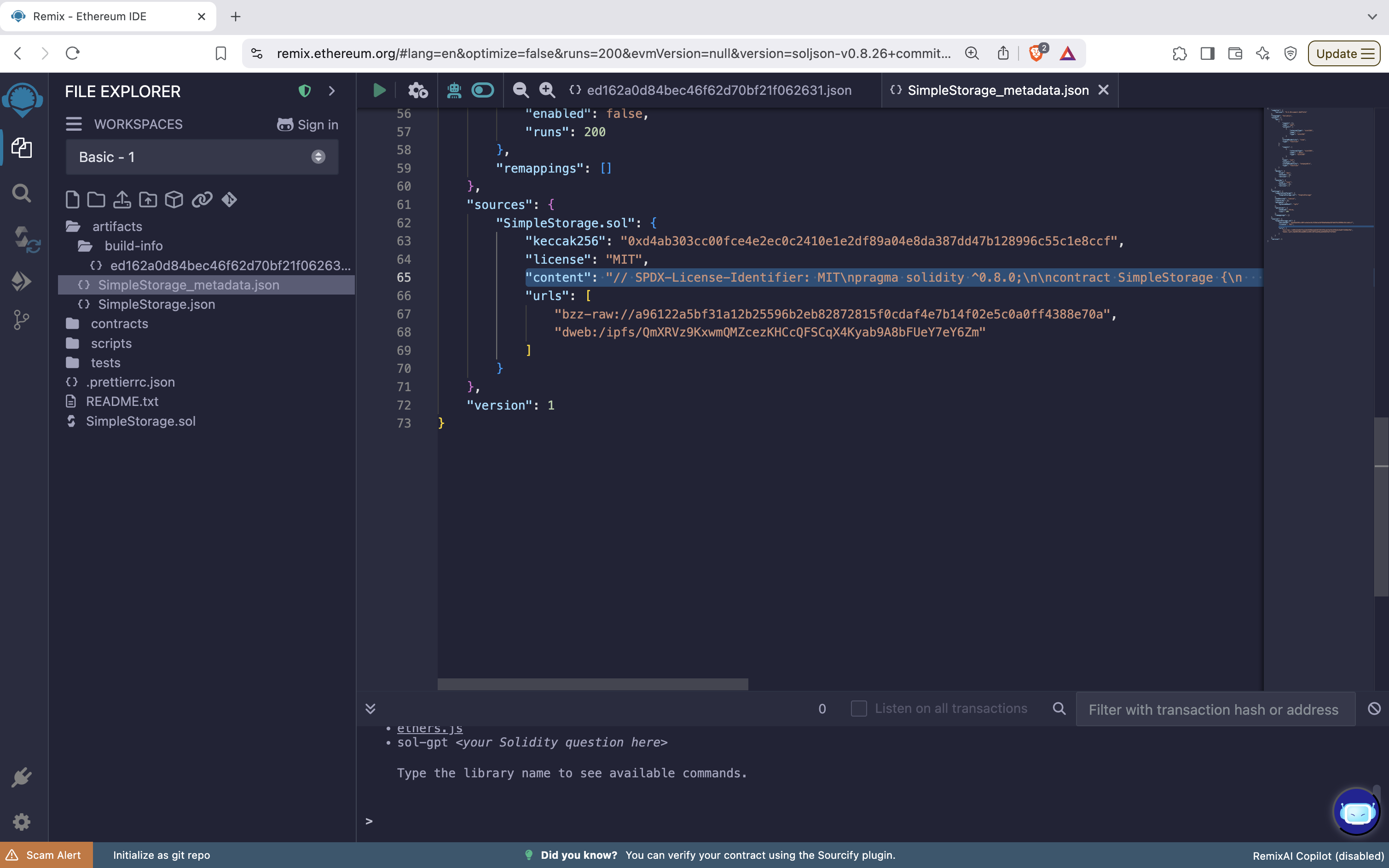
3. Download the SimpleStorage_metadata.json file
Download the file to your machine. You upload it to Subscan in step 5.4. Navigate to Subscan
Go to peaq.subscan.io or agung-testnet.subscan.io, search for your deployed contract address, and open theContract tab.
5. Verify Contract
- Confirm the
Contract Addressfield matches the contract you want to verify. - Select Solidity (Standard-JSON-Input) as
Compiler Type. - Set
Include Nightly Buildsif you compiled with a nightly build. - Choose the
Compiler Versionyou compiled with. - Upload the file you downloaded from Remix.
- Click
Verify & Publish.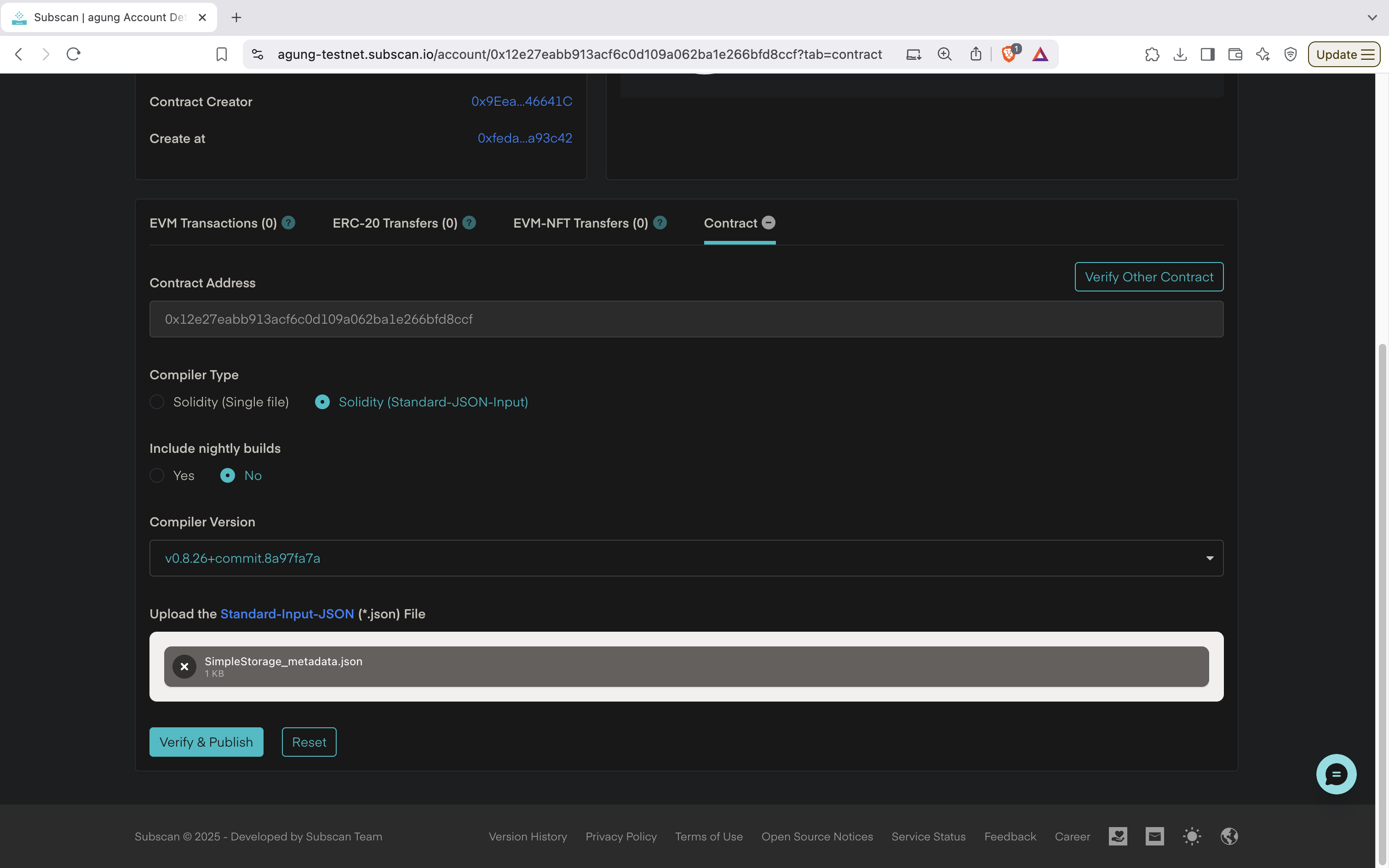
6. Confirm Verification
A verified contract shows a green check next to Contract.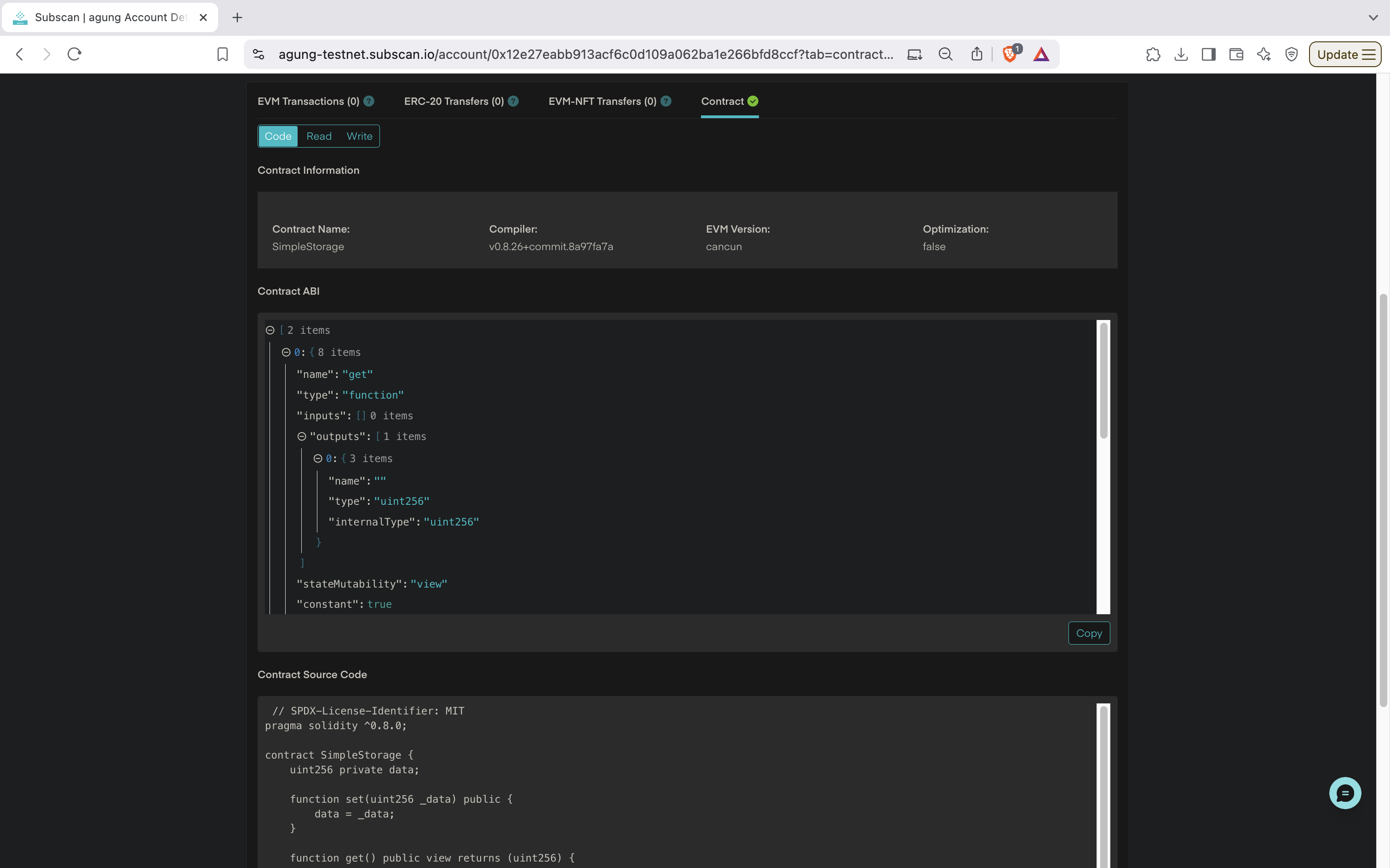
SimpleStorage that is Solidity 0.8.26, EVM cancun, optimization off, and the two functions set(uint256 _data) and get().
Method 2: Sourcify Verification (decentralized record)
Sourcify is an independent verification service. No peaq explorer reads Sourcify today, so this does not make the contract readable on Subscan. It gives you an explorer-independent record of the source.1. Navigate to Sourcify
Go to sourcify.dev and click Verify.2. Select Network
Select peaq (Chain ID 3338) from the network dropdown.3. Enter Contract Information
Enter the deployed contract address. Sourcify detects contracts that are already verified; otherwise it opens the verification form.4. Upload Contract Files
Choose Sourcify’s Metadata.json verification method. Upload the compiler metadata JSON in the first file input and all Solidity source files in the second file input, as described in the Sourcify verification instructions.Upload Metadata JSON
- Hardhat: in
artifacts/build-info/<hash>.json, the fieldoutput.contracts[<source path>][<contract name>].metadataholds the metadata as a JSON string. Parse that string and save the resulting object asmetadata.json. - Foundry: the
metadataobject insideout/YourContract.sol/YourContract.json, or runforge inspect YourContract metadata > metadata.jsonand upload that file. - Remix: the metadata JSON from the artifacts folder.
Upload Source Files
- Upload your main Solidity file (for example
SimpleStorage.sol) and every imported dependency or library listed in the metadata. - Keep the source paths you compiled with.
5. Verify Compilation Settings
Sourcify reads the settings from the metadata and checks them:- Compiler version: must match the version used at compile time.
- EVM version: must match the version used at compile time. peaq’s EVM runs the Cancun configuration.
- Optimization: enabled or disabled, and the number of runs.
6. Submit for Verification
Review the contract details and the compilation metadata, then click Verify. Sourcify recompiles the contract and compares the result with the deployed bytecode.7. Verification Results
Sourcify reports one of two results:- Exact Match (previously called perfect match): the recompiled bytecode matches the deployed bytecode byte for byte, metadata hash included.
- Match (previously called partial match): everything matches except the metadata hash. Recheck the optimization and EVM version settings if you expected an exact match.
8. View Verified Contract
- Open the Sourcify repository to read the stored source and its IPFS hash.
- Use the contract ABI for frontend integration.
- Subscan does not read Sourcify. Verify there as well (Method 1) if you want decoded calls on peaq.subscan.io.