peaq has one block explorer, Subscan, and one machine explorer, the Machine Explorer at machines.peaq.xyz. Subscan indexes blocks, extrinsics, EVM transactions, accounts and contracts on both networks. The Machine Explorer indexes the machines themselves: who operates them, what tier they are on, how much PEAQ is bonded, and the validators securing the chain. peaqscan (peaqscan.xyz) and Blockscout (scout.peaq.xyz) were retired in August 2026. peaqscan.xyz redirects to Subscan; scout.peaq.xyz no longer resolves. Update any bookmarks or links you still have.

Subscan

Subscan serves pre-indexed data: blocks, extrinsics, EVM transactions, token transfers, accounts and contracts, with search, filtering and history. It covers both the Substrate and the EVM side of peaq, so a DID precompile call and an ERC-20 transfer show up in the same account view.

Using Subscan

  1. Visit Subscan’s peaq Explorer.
    • Open peaq.subscan.io for mainnet or agung-testnet.subscan.io for the testnet (agung in these examples).
    • The dashboard provides a high-level overview of the network, including key metrics like finalized blocks, signed extrinsics, and active accounts.
  2. Search for Accounts or Contracts
    • In the search bar enter an account address or contract address to quickly locate its details.
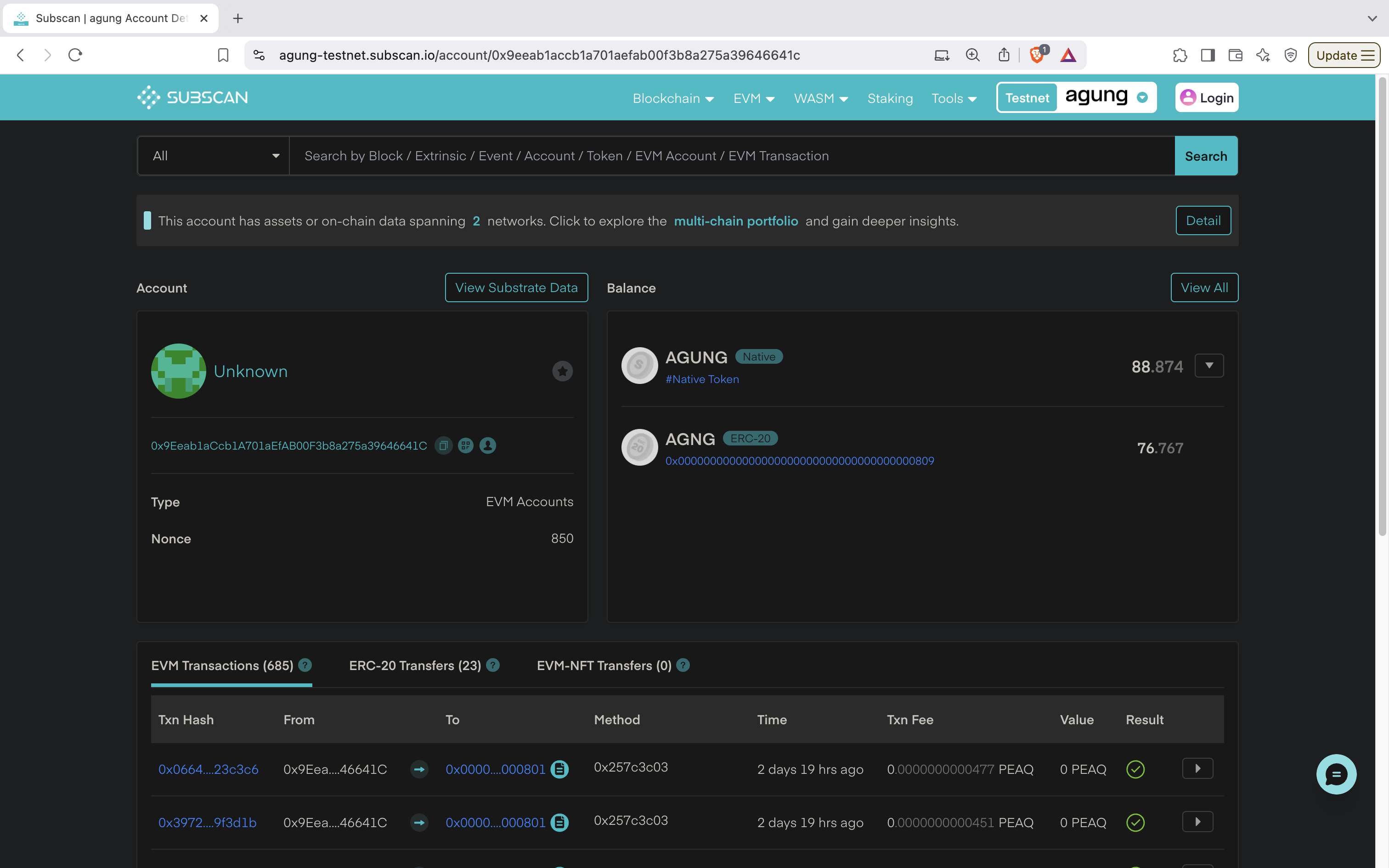
    Example of an account search: The account above was searched by inputting 0x9Eeab1aCcb1A701aEfAB00F3b8a275a39646641C in the search bar. Subscan returned the account that is affiliated with this address. block-explorers-6

Account Details

  • Account: Includes the address of the account and the nonce which represents the number of transactions sent from this account.
  • Balance: Displays the amount of the native token an account has. Shows how much is transferable and how much is reserved (during pallet usage).
  • EVM Transactions:
    • Displays a list of transactions submitted by this account to the blockchain.
    • Each EVM Transaction contains the following:
      • Tx Hash: 0x0664....23c3c6 - The unique transaction hash used to identify this tx.
      • From: 0x9Eea....46641C - Account used to send the tx.
      • To: 0x0000....000801 - Where the transaction was sent to (RBAC precompile in this case).
      • Method: 0x257c3c03 - Function method executed on the Smart Contract (human-readable when contract is verified).
      • Time: 2 days 19 hrs ago - Indicates when the tx was added to the blockchain.
      • Txn Fee: 0.0000000000477PEAQ - Cost to send the tx.
      • Value: 0.0000000000477PEAQ - Amount of native token that was transferred during the operation.
      • Result: ✅ - Indicates that the extrinsic was successfully executed.
  • ERC-20 Transfers: Shows the fund transfers initiated by this account.
  • EVM-NFT Transfers History: Shows the NFT transfers initiated by this account.

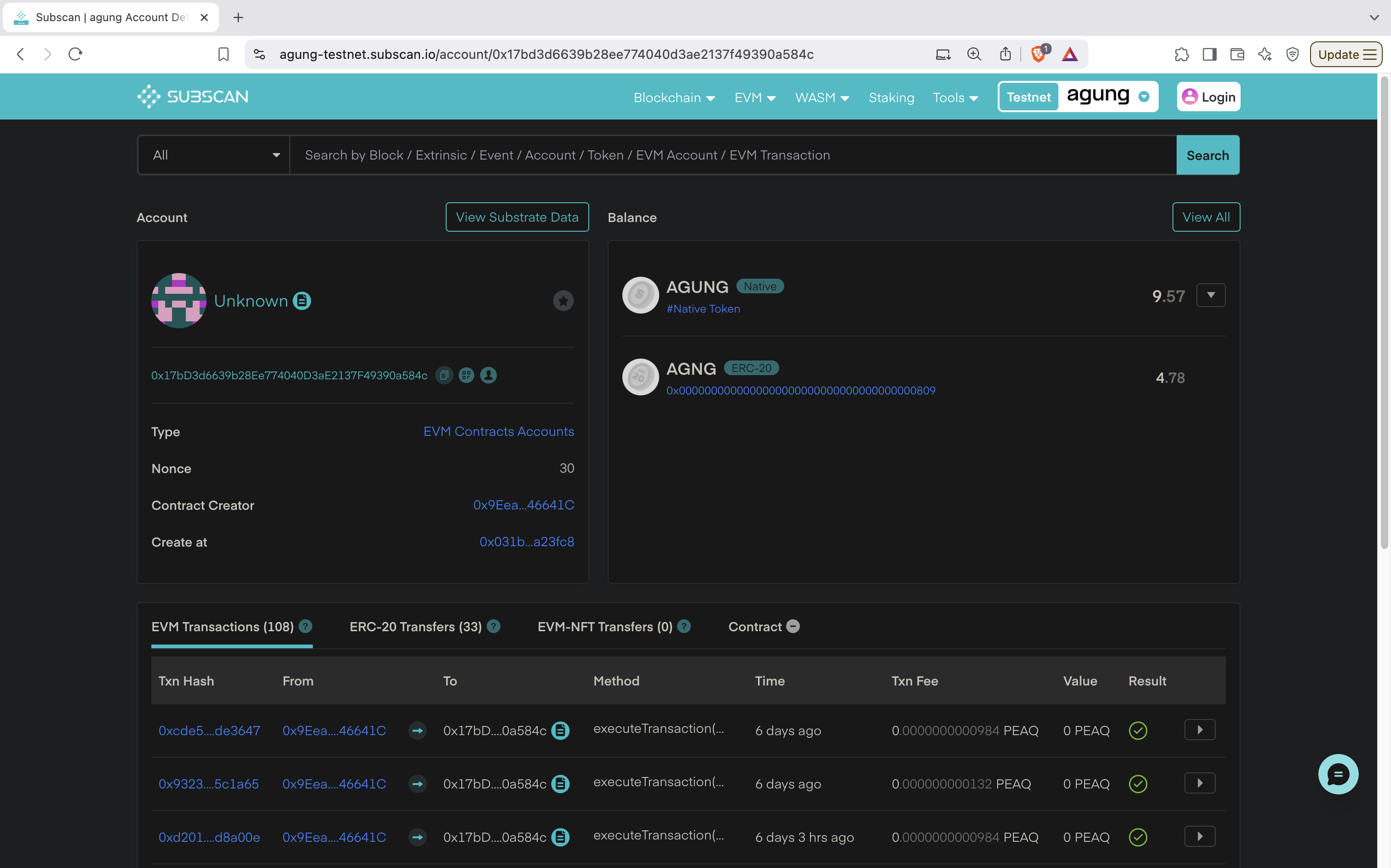
Example of a contract search: The contract was found by submitting the deployed contract address of 0x17bD3d6639b28Ee774040D3aE2137F49390a584c in the Subscan search bar. It took me to the page: block-explorers-7

Contract Details

  • Account:
    • Unknown: Indicates the account hasn’t been assigned a custom or recognizable name by the user.
    • Account Address: Unique identifier of the EVM contract.
    • Type: EVM-based account, meaning it’s a smart contract account created and executed within the EVM environment.
    • Nonce: Indicates that this contract account has performed 30 transactions so far.
    • Contract Creator: The EVM address of the account that deployed this contract.
    • Created At: Refers to the transaction hash where this contract was initially deployed.
  • Balance:
    • Total Balance: 9.57 AGUNG – The contract currently has native AGUNG tokens.
  • Transaction Details:
    • EVM Transactions (685): Tracks interactions with this EVM contract.
      • Txn Hash: 0xcde5....de3647 - The unique identifier for the transaction involving this contract. Clicking this link shows more details about the transaction.
      • From: 0x9Eea...46641C - The address of the sender who interacted with the contract (contract creator in this case).
      • To: 0x17bD....0a584c - The address of this contract, which received the transaction.
      • Method: executeTransaction() - The method or function called within the contract.
      • Time: 6 days ago - Indicates when this transaction was processed.
      • Txn Fee: 0.0000000000984PEAQ - The transaction fee paid for executing this transaction on the network.
      • Value: 0 PEAQ - No value (native tokens) was transferred with this transaction.
      • Result: ✅ - Indicates that the transaction was successfully executed.
    • ERC-20 Transfers (22): Indicates no transfers of ERC-20 tokens (standard fungible tokens) related to this contract.
    • ERC-721 Transfers (0): Indicates no transfers of ERC-721 tokens (standard NFTs) related to this contract.
    • Contract: Includes details on how to verify a contract.

Transactions and blocks

  • Paste a transaction hash (0x…, 66 characters) or an extrinsic index (<block>-<index>) into the search bar to open it. The transaction page shows the sender, the target, the decoded method when the contract is verified, the fee, and the events the call emitted.
  • Paste a block number or block hash to open the block with its extrinsics and events.

Verified contracts

  • A verified contract shows decoded method names and parameters on every transaction. See Verify Smart Contract.

Machine Explorer

The Machine Explorer is not a block explorer: it indexes peaq mainnet for machines instead of transactions.
  • Machines: every machine registered on peaq, with operator, machine type and credit rating. Search by DID or address.
  • Machine page: machines.peaq.xyz/machine/0x<address> for a Tokenomics 1.0 or mirrored legacy machine, machines.peaq.xyz/machine/<decimal machine id> for a machine activated under Economics 2.0. Shows identity, activation and bond status, and the on-chain event history, with links to the Subscan events.
  • Validators: the chain validators with commission, delegator count, total stake and APR, plus the trust validators of Economics 2.0.
  • Economics: activated machines, PEAQ bonded, share of circulating supply, and the tier prices converted at the current oracle rate.
Data comes from an indexer that reads finalized blocks, so allow a few minutes for a fresh activation to appear. Use it to check that a machine you onboarded is live; use Subscan for the transaction itself.

Summary

  • Subscan: transactions, blocks, extrinsics, accounts and contracts on peaq mainnet and agung. Contract verification for readable method calls.
  • Machine Explorer: machines, operators, validators and Economics 2.0 figures on peaq mainnet. Not for transactions or blocks.