> ## Documentation Index
> Fetch the complete documentation index at: https://docs.peaq.xyz/llms.txt
> Use this file to discover all available pages before exploring further.
# Verify Smart Contract
In this section, we will go over the process of verifying a smart contract on peaq network using **Sourcify** and **Blockscout**, as well as **Subscan**. Verifying your smart contract allows for readable and interpretable data
(such as function calls and parameters) to be displayed **directly** in block explorers, making it easier to understand and debug interactions with the contract.
## Prerequisites
* Familiar with **Block Explorers**. If not checkout the [Block Explorers](/peaqchain/build/basic-operations/block-explorers) section.
* You have previously deployed a smart contract using one of the previous tutorials (e.g. `SimpleStorage.sol`).
## Method 1: Sourcify Verification
**Sourcify** is a decentralized contract verification service that provides transparent and immutable verification for smart contracts. This is the recommended method for contract verification on peaq mainnet.
### 1. Navigate to Sourcify
Go to [sourcify.dev](https://sourcify.dev/) and click **"Verify"**.
### 2. Select Network
* From the network dropdown, select **"peaq"** (Chain ID: 3338)
* Ensure you're verifying on the correct network where your contract is deployed
### 3. Enter Contract Information
* **Contract Address**: Enter your deployed contract address
* Sourcify will automatically detect if the contract is already verified
* If unverified, you'll proceed to the verification form
### 4. Upload Contract Files
Choose your preferred verification method:
#### Option A: Upload Source Files
* **Drag and drop** or **browse** to upload your main Solidity file (e.g., `SimpleStorage.sol`)
* Upload any **imported dependencies** or libraries
* Maintain the **correct folder structure** as used during compilation
* Include any **configuration files** (e.g., `hardhat.config.js`, `foundry.toml`)
#### Option B: Upload Metadata JSON
* **Hardhat users**: Upload the complete metadata from `artifacts/contracts/YourContract.sol/YourContract.json`
* **Foundry users**: Upload the metadata from `out/YourContract.sol/YourContract.json`
* **Remix users**: Download and upload the metadata JSON from the artifacts folder
### 5. Verify Compilation Settings
Sourcify will automatically extract and verify:
* **Compiler Version**: Must match the version used during compilation
* **EVM Version**: Should be set to `london` (required for peaq network)
* **Optimization Settings**: Enabled/disabled status and number of runs
* **Source Maps**: For debugging and verification accuracy
### 6. Submit for Verification
* Review the **contract details** and **compilation metadata**
* Click **"Verify"** to submit your contract for verification
* Sourcify will compile the contract and compare bytecode
* Wait for the verification process to complete (usually takes 1-2 minutes)
### 7. Verification Results
Upon successful verification:
#### Perfect Match
* Your contract achieves **"Perfect Match"** status
* Source code is **permanently stored** on IPFS
* Contract is **automatically indexed** by Sourcify
* Verification data is **accessible across all Sourcify-compatible explorers**
#### Partial Match
* If you get a **"Partial Match"**, the core logic matches but metadata differs
* Check compilation settings, especially optimization and EVM version
* Consider re-verifying with exact compilation parameters
### 8. View Verified Contract
After verification:
* Visit the **Sourcify repository** to view your contract's source code
* Check **block explorers** like [scout.peaq.xyz](https://scout.peaq.xyz/) - your contract will now show as verified
* Access the **contract's IPFS hash** for permanent source code storage
* Use the **contract ABI** for frontend integration
## Method 2: Subscan Verification (Alternative)
If you prefer to use Subscan for verification, follow these steps:
### 1. Prepare Metadata from Remix
We will be using the same [Remix IDE](https://remix.ethereum.org/) workspace that was used to deploy the `SimpleStorage.sol` contract.
Once you are there:
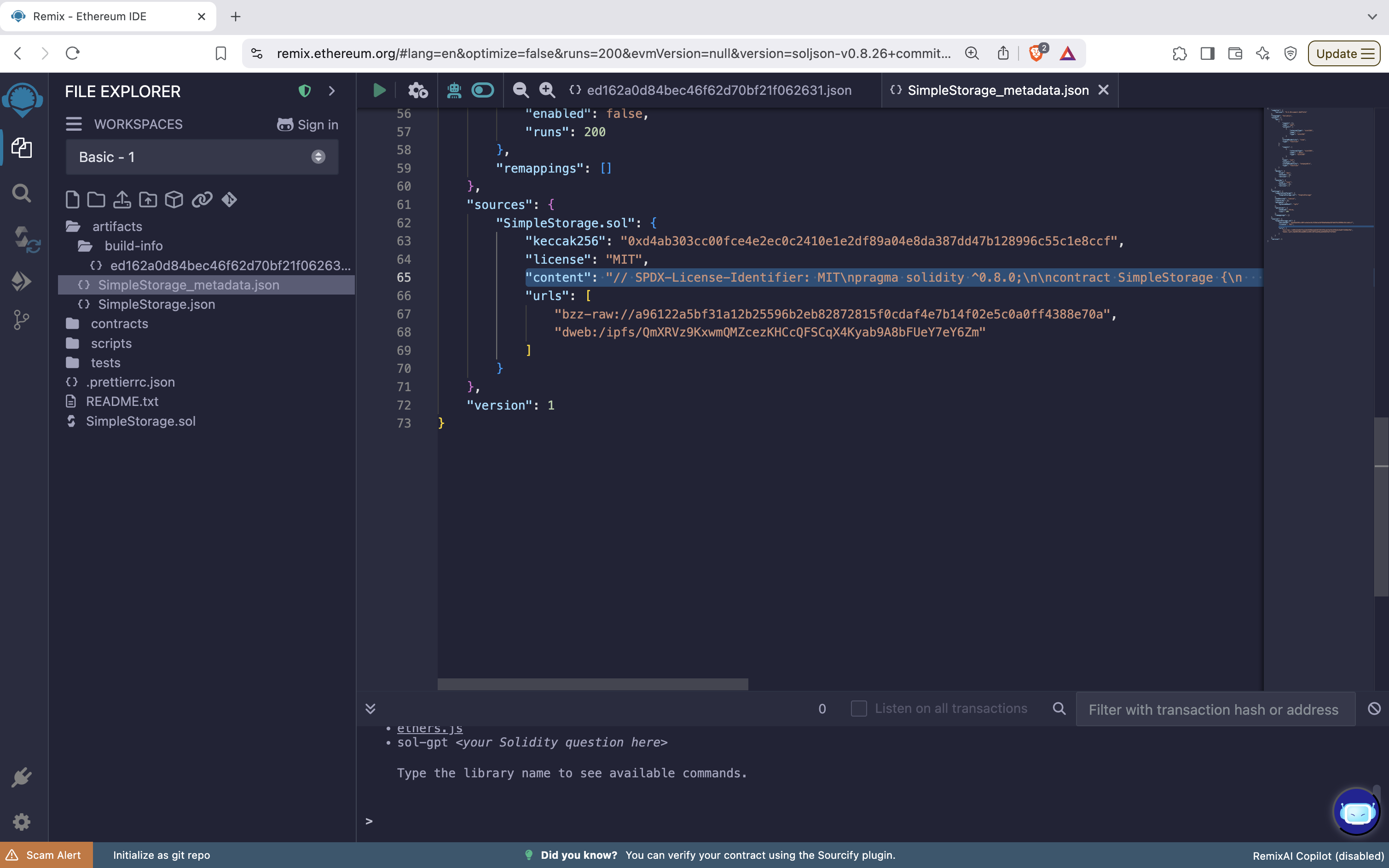
* Open up the `artifacts/build-info/hex_value` file. This contains the content we need to move to the `SimpleStorage_metadata.json` file.
 * Copy and paste the entire `content` line as shown in the screenshot above.
### 2. Paste content into SimpleStorage\_metadata
After copying this content we will need to paste it into the `SimpleStorage_metadata.json` file.
* Navigate to the `SimpleStorage_metadata.json` file.
* Find the `sources` object where the data for contract `SimpleStorage.sol` is stored.
* Paste the content after the `license` field.
* Copy and paste the entire `content` line as shown in the screenshot above.
### 2. Paste content into SimpleStorage\_metadata
After copying this content we will need to paste it into the `SimpleStorage_metadata.json` file.
* Navigate to the `SimpleStorage_metadata.json` file.
* Find the `sources` object where the data for contract `SimpleStorage.sol` is stored.
* Paste the content after the `license` field.
 ### 3. Download the SimpleStorage\_metadata.json file
The next step is to simply download this file to your local machine. It will be used later in the verification process.
### 4. Navigate to Subscan
Now go to [peaq.subscan.io](https://peaq.subscan.io/) or [agung-testnet.subscan.io](https://agung-testnet.subscan.io/) and search for your deployed contract address. Then go to the `Contract` tab.
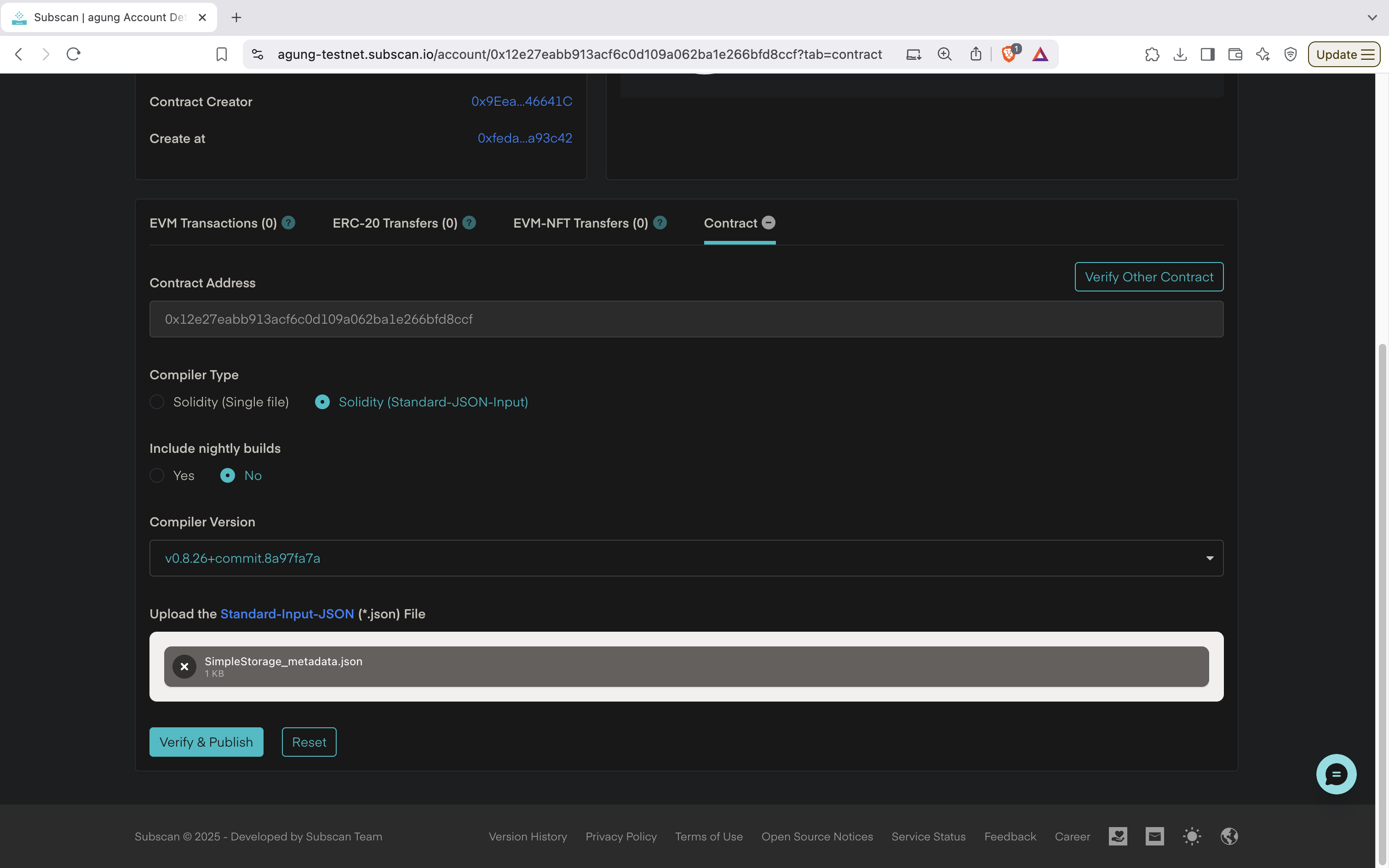
### 5. Verify Contract
* Confirm the `Contract Address` field matched your Smart Contract to verify.
* Select **Solidity (Standard-JSON-Input)** as `Compiler Type`.
* Pick whether or not you would like to `Include Nightly Builds`.
* Choose the `Compiler Version` that was used when you compiled your smart contract.
* Upload the file that we downloaded from Remix earlier.
* Finally, click the `Verify & Publish` button.
### 3. Download the SimpleStorage\_metadata.json file
The next step is to simply download this file to your local machine. It will be used later in the verification process.
### 4. Navigate to Subscan
Now go to [peaq.subscan.io](https://peaq.subscan.io/) or [agung-testnet.subscan.io](https://agung-testnet.subscan.io/) and search for your deployed contract address. Then go to the `Contract` tab.
### 5. Verify Contract
* Confirm the `Contract Address` field matched your Smart Contract to verify.
* Select **Solidity (Standard-JSON-Input)** as `Compiler Type`.
* Pick whether or not you would like to `Include Nightly Builds`.
* Choose the `Compiler Version` that was used when you compiled your smart contract.
* Upload the file that we downloaded from Remix earlier.
* Finally, click the `Verify & Publish` button.
 ### 6. Confirm Verification
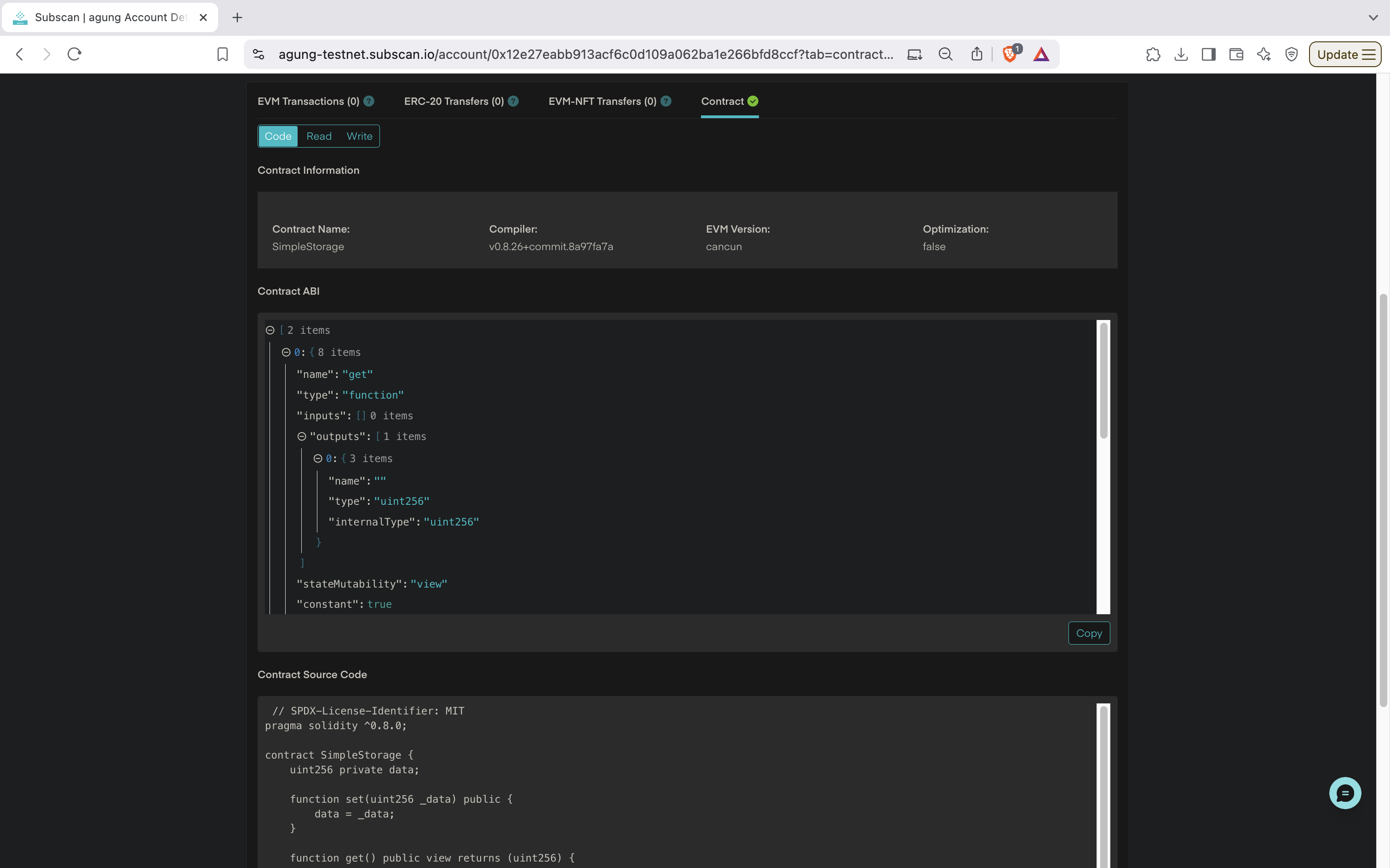
A proper Contract Verification will have a ✅ next to **Contract**.
### 6. Confirm Verification
A proper Contract Verification will have a ✅ next to **Contract**.
 #### Contract Information Displayed
* **Contract Name**: `SimpleStorage`
* **Compiler Version**: `v0.8.26+commit.8a97fa7a`
* **EVM Version**: `cancun`
* **Optimization**: `false`
This indicates the deployed contract was compiled using Solidity version `0.8.26`, with the Ethereum Virtual Machine (EVM) set to `cancun`, and without optimization enabled.
#### Contract ABI
* The **ABI** (Application Binary Interface) specifies the interface of the contract.
* It includes the function details such as:
* **Function `get`**:
* Inputs: None.
* Outputs: A single `uint256` value.
* Mutability: `view` (read-only).
* **Function `set`**:
* Inputs: A single `uint256` value (`_data`).
* Outputs: None.
* Mutability: `nonpayable` (modifies the state).
This confirms the contract has two primary functions:
* `set(uint256 _data)`: Stores a value.
* `get()`: Retrieves the stored value.
#### Contract Source Code
The source code of the contract is displayed as it was written:
```javascript theme={"theme":{"light":"github-light-default","dark":"github-dark"}}
solidity
Copy code
// SPDX-License-Identifier: MIT
pragma solidity ^0.8.0;
contract SimpleStorage {
uint256 private data;
function set(uint256 _data) public {
data = _data;
}
function get() public view returns (uint256) {
return data;
}
}
```
* **Logic**:
* `set`: Allows the user to save a `uint256` value in the contract's state.
* `get`: Returns the saved value without modifying the state.
#### Contract Bytecode
* The **bytecode** is the compiled version of the Solidity source code.
* It is what gets deployed to the Ethereum blockchain.
* This bytecode matches the source code provided in the screenshot.
## Summary
### Recommended Approach
For peaq mainnet, use **Sourcify verification** ([sourcify.dev](https://sourcify.dev/)) as it provides:
* **Decentralized verification** with IPFS storage
* **Immutable source code** preservation
* **Cross-explorer compatibility** (automatically appears on scout.peaq.xyz and other Sourcify-compatible explorers)
* **Perfect Match** and **Partial Match** verification levels
### Alternative Method
Subscan verification remains available as an alternative, particularly useful for detailed transaction analysis and historical data exploration.
By completing either verification process, your contract will be displayed with all relevant details, ensuring transparency and enabling easier interaction with your deployed smart contract on the peaq network.
#### Contract Information Displayed
* **Contract Name**: `SimpleStorage`
* **Compiler Version**: `v0.8.26+commit.8a97fa7a`
* **EVM Version**: `cancun`
* **Optimization**: `false`
This indicates the deployed contract was compiled using Solidity version `0.8.26`, with the Ethereum Virtual Machine (EVM) set to `cancun`, and without optimization enabled.
#### Contract ABI
* The **ABI** (Application Binary Interface) specifies the interface of the contract.
* It includes the function details such as:
* **Function `get`**:
* Inputs: None.
* Outputs: A single `uint256` value.
* Mutability: `view` (read-only).
* **Function `set`**:
* Inputs: A single `uint256` value (`_data`).
* Outputs: None.
* Mutability: `nonpayable` (modifies the state).
This confirms the contract has two primary functions:
* `set(uint256 _data)`: Stores a value.
* `get()`: Retrieves the stored value.
#### Contract Source Code
The source code of the contract is displayed as it was written:
```javascript theme={"theme":{"light":"github-light-default","dark":"github-dark"}}
solidity
Copy code
// SPDX-License-Identifier: MIT
pragma solidity ^0.8.0;
contract SimpleStorage {
uint256 private data;
function set(uint256 _data) public {
data = _data;
}
function get() public view returns (uint256) {
return data;
}
}
```
* **Logic**:
* `set`: Allows the user to save a `uint256` value in the contract's state.
* `get`: Returns the saved value without modifying the state.
#### Contract Bytecode
* The **bytecode** is the compiled version of the Solidity source code.
* It is what gets deployed to the Ethereum blockchain.
* This bytecode matches the source code provided in the screenshot.
## Summary
### Recommended Approach
For peaq mainnet, use **Sourcify verification** ([sourcify.dev](https://sourcify.dev/)) as it provides:
* **Decentralized verification** with IPFS storage
* **Immutable source code** preservation
* **Cross-explorer compatibility** (automatically appears on scout.peaq.xyz and other Sourcify-compatible explorers)
* **Perfect Match** and **Partial Match** verification levels
### Alternative Method
Subscan verification remains available as an alternative, particularly useful for detailed transaction analysis and historical data exploration.
By completing either verification process, your contract will be displayed with all relevant details, ensuring transparency and enabling easier interaction with your deployed smart contract on the peaq network.