> ## Documentation Index
> Fetch the complete documentation index at: https://docs.peaq.xyz/llms.txt
> Use this file to discover all available pages before exploring further.
# Block Explorers
This guide will provide an introduction to the **block explorers** in peaq's ecosystem, which are **peaqscan**, **Blockscout**, **Polkadot.js**, and **Subscan**. Blockchain explorers are essential tools for interacting with
and analyzing blockchain networks. They allow users to view transaction histories, account details, network statistics, pallets, and much more.
## What you'll learn
* How to use **peaqscan** as the primary explorer for EVM-focused debugging, simulation, and analytics.
* How to use **Blockscout** for EVM-focused exploration and smart contract verification.
* How to interact with pallets using **Polkadot.js** and leverage it for real-time extrinsic interactions.
* How to explore transaction data, blocks, and accounts using **Subscan.**
## Links
The following table provides the relevant links to the **peaqscan**, **Blockscout**, **Polkadot.js**, and **Subscan** explorers for each network so you can follow along.
| **Network** | **peaqscan** | **Blockscout** | **Subscan** | **Polkadot.js** |
| -------------- | -------------------------------------------------- | ---------------------------------------------- | ----------------------------------------------------- | -------------------------------------------------------------------------------------------------------------- |
| peaq (mainnet) | [peaqscan Explorer](https://peaqscan.xyz/) | [Blockscout Explorer](https://scout.peaq.xyz/) | [Subscan Explorer](https://peaq.subscan.io/) | [Polkadot Native Explorer](https://polkadot.js.org/apps/?rpc=wss://peaq.api.onfinality.io/public-ws#/explorer) |
| peaq (testnet) | [peaqscan Explorer](https://testnet.peaqscan.xyz/) | **N/A** | [Subscan Explorer](https://agung-testnet.subscan.io/) | [Polkadot Native Explorer](https://polkadot.js.org/apps/?rpc=wss://wss-async-agung.peaq.xyz#/explorer) |
The following will reference the **peaq testnet** and block explorers to prevent unwanted data from being added to the live **peaq mainnet**. Information referenced in this document is the same between the networks.
## Instructions
## peaqscan
**peaqscan** is the primary EVM explorer for peaq, offering advanced debugging, simulation, and analytics tailored for Ethereum-compatible chains. It provides real-time visibility into transactions, deep execution traces, decoded input/output, and powerful tooling to test and monitor activity on peaq.
### Key Features of peaqscan
#### 1. EVM Transaction Insights & Debugging
* Decoded function inputs and event logs when ABI is available
* Detailed execution traces with call tree, revert reasons, and stack traces
* Gas profiler and opcode-level analysis to optimize contracts
#### 2. Transaction Simulation & Forks
* Simulate transactions against current or historical state before broadcasting
* Create ephemeral forks to test contract changes and scenarios safely
* What-if analysis for governance, upgrades, or parameter changes
#### 3. Contract Intelligence
* ABI-aware decoding and human-readable method names
* Source and verified metadata display when available
* Read/Write interfaces for verified contracts
#### 4. Monitoring & Alerting
* Real-time monitoring on addresses, contracts, and events
* Alerts and webhooks for on-chain signals (errors, thresholds, activity)
### Using peaqscan for peaq
#### Accessing peaqscan
* Mainnet: [peaqscan.xyz](https://peaqscan.xyz/)
* Testnet: [testnet.peaqscan.xyz](https://testnet.peaqscan.xyz/)
 #### Navigation & Search
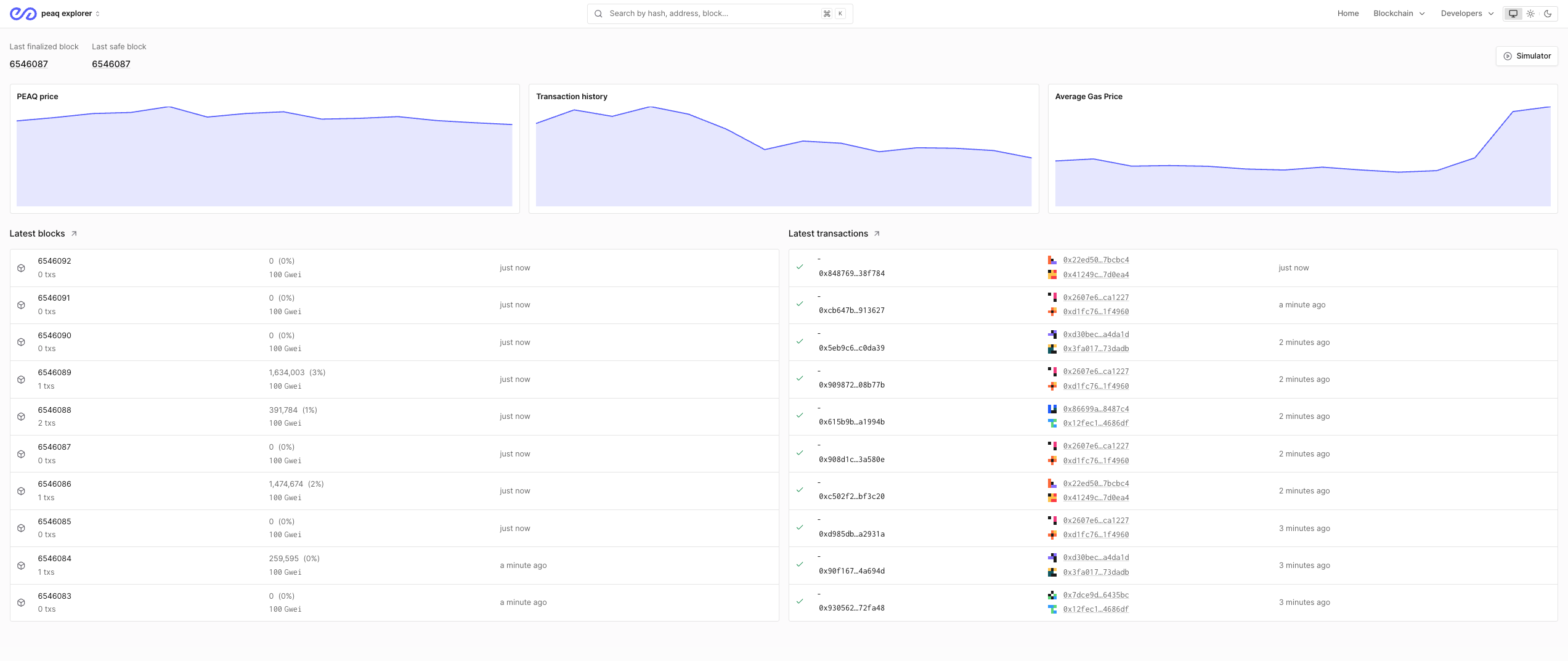
1. Use the global search to find EVM addresses, transactions, or blocks
2. Pin frequently monitored addresses and create custom views
3. Open any transaction to inspect decoded inputs, logs, traces, and gas usage
#### Navigation & Search
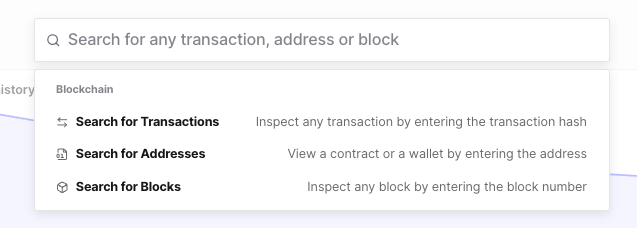
1. Use the global search to find EVM addresses, transactions, or blocks
2. Pin frequently monitored addresses and create custom views
3. Open any transaction to inspect decoded inputs, logs, traces, and gas usage
 #### Contract Exploration
1. Contract Overview
* Address, creator, deployment tx and block
* Verification status and ABI availability
* Read and Write tabs for interacting with verified contracts
2. Transactions
* Decoded method names and parameters
* Success/failure with revert reasons
* Internal calls and value transfers
3. Analytics
* Gas usage, call frequency, and top interacting accounts
### When to Use peaqscan vs Other Explorers
* Use peaqscan when:
* You need to debug failing transactions with full traces and revert reasons
* You want to simulate transactions or test scenarios on forks before broadcasting
* You require ABI-aware decoding, gas profiling, or alerting/monitoring
* You want a consolidated EVM developer experience for peaq
* Use Blockscout when:
* You want a lightweight EVM explorer view and contract verification via its flow
* You need a familiar interface for quick lookups
* Use Polkadot.js when:
* Interacting with Substrate pallets (peaqDID, peaqRBAC, peaqStorage)
* Submitting custom extrinsics or testing runtime-specific calls
* Use Subscan when:
* You need a high-level network overview and statistics
* You want historical account/contract activity with flexible filtering
## Blockscout
**Blockscout** is an EVM-focused blockchain explorer that provides specialized tools for exploring smart contracts, EVM transactions, and DeFi activity on peaq. Unlike Polkadot.js (which focuses on Substrate pallets) and Subscan (which provides general blockchain data), Blockscout is optimized for Ethereum-compatible features.
### Key Features of Blockscout
#### 1. **EVM Transaction Analysis**
* **Detailed EVM Logs**: View comprehensive logs, events, and state changes from smart contract interactions
* **Internal Transactions**: Track internal calls within smart contract executions
* **Gas Usage Tracking**: Monitor gas consumption and optimization opportunities
* **Method Decoding**: Automatic decoding of contract function calls when contracts are verified
#### 2. **Smart Contract Verification & Interaction**
* **Sourcify Integration**: Built-in support for decentralized contract verification
* **Contract Source Code**: View verified contract source code directly in the explorer
* **Read/Write Interface**: Interactive interface to query and execute contract functions
* **Constructor Arguments**: View deployment parameters and contract initialization data
### Using Blockscout for peaq
#### Accessing Blockscout
Visit [scout.peaq.xyz](https://scout.peaq.xyz/) for mainnet:
#### Contract Exploration
1. Contract Overview
* Address, creator, deployment tx and block
* Verification status and ABI availability
* Read and Write tabs for interacting with verified contracts
2. Transactions
* Decoded method names and parameters
* Success/failure with revert reasons
* Internal calls and value transfers
3. Analytics
* Gas usage, call frequency, and top interacting accounts
### When to Use peaqscan vs Other Explorers
* Use peaqscan when:
* You need to debug failing transactions with full traces and revert reasons
* You want to simulate transactions or test scenarios on forks before broadcasting
* You require ABI-aware decoding, gas profiling, or alerting/monitoring
* You want a consolidated EVM developer experience for peaq
* Use Blockscout when:
* You want a lightweight EVM explorer view and contract verification via its flow
* You need a familiar interface for quick lookups
* Use Polkadot.js when:
* Interacting with Substrate pallets (peaqDID, peaqRBAC, peaqStorage)
* Submitting custom extrinsics or testing runtime-specific calls
* Use Subscan when:
* You need a high-level network overview and statistics
* You want historical account/contract activity with flexible filtering
## Blockscout
**Blockscout** is an EVM-focused blockchain explorer that provides specialized tools for exploring smart contracts, EVM transactions, and DeFi activity on peaq. Unlike Polkadot.js (which focuses on Substrate pallets) and Subscan (which provides general blockchain data), Blockscout is optimized for Ethereum-compatible features.
### Key Features of Blockscout
#### 1. **EVM Transaction Analysis**
* **Detailed EVM Logs**: View comprehensive logs, events, and state changes from smart contract interactions
* **Internal Transactions**: Track internal calls within smart contract executions
* **Gas Usage Tracking**: Monitor gas consumption and optimization opportunities
* **Method Decoding**: Automatic decoding of contract function calls when contracts are verified
#### 2. **Smart Contract Verification & Interaction**
* **Sourcify Integration**: Built-in support for decentralized contract verification
* **Contract Source Code**: View verified contract source code directly in the explorer
* **Read/Write Interface**: Interactive interface to query and execute contract functions
* **Constructor Arguments**: View deployment parameters and contract initialization data
### Using Blockscout for peaq
#### Accessing Blockscout
Visit [scout.peaq.xyz](https://scout.peaq.xyz/) for mainnet:
 #### Navigation & Search
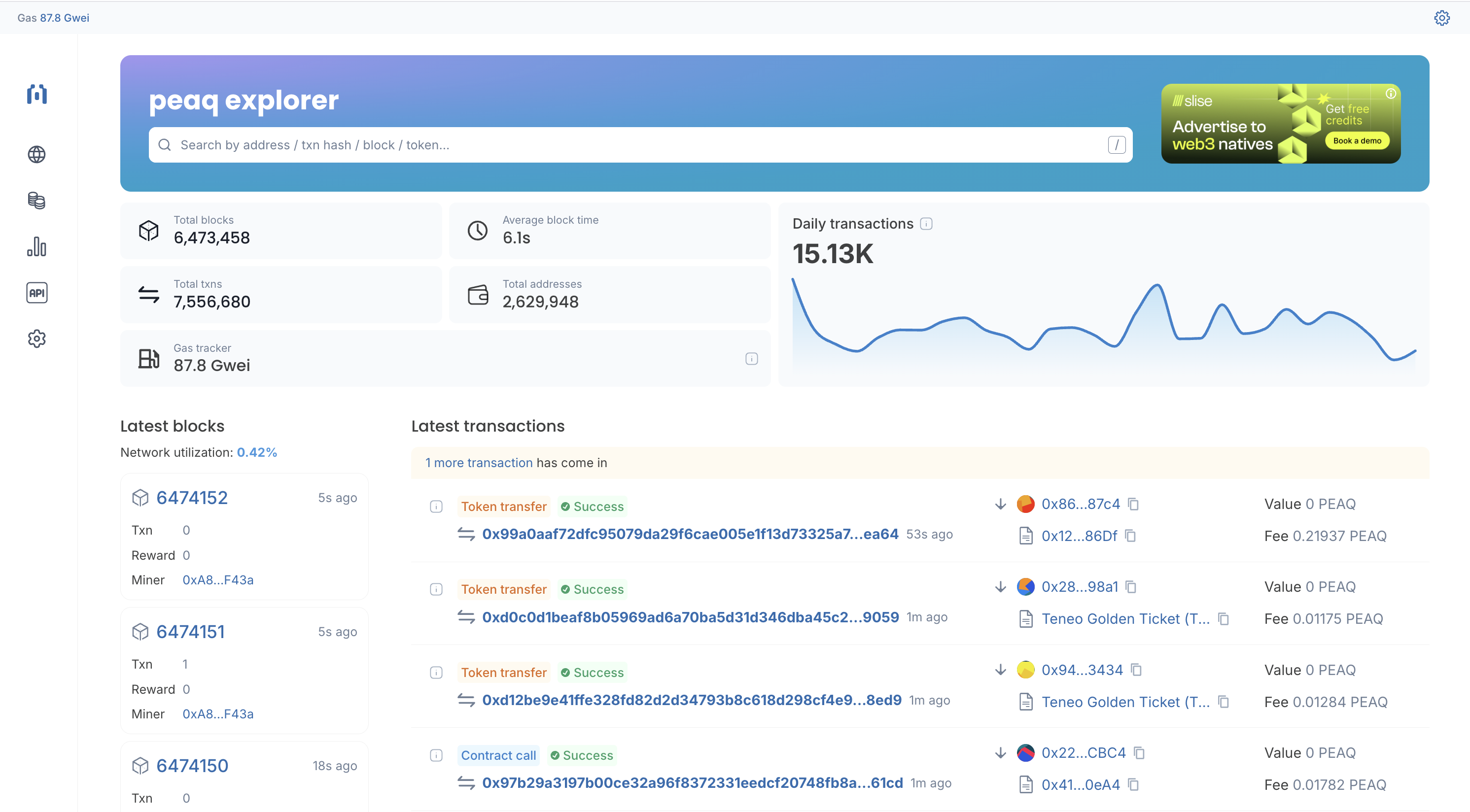
1. **Search Functionality**:
* Enter contract addresses,
* Search for token symbols (e.g., "PEAQ", "SLC", etc.)
2. **Main Dashboard**:
* **Network Statistics**: Block height, average block time, total transactions
* **Recent Blocks**: Latest blocks with validator information and transaction count
* **Recent Transactions**: Live feed of EVM transactions with gas usage and status
#### Contract Exploration
**Example Contract Analysis**:
When viewing a smart contract on Blockscout, you'll see:
1. **Contract Overview**:
* Contract address and creation transaction
* Creator address and deployment block
* Current balance and transaction count
* Verification status (verified ✅ or unverified)
2. **Transactions Tab**:
* All transactions involving the contract
* Method names (decoded for verified contracts)
* Gas usage and transaction fees
* Success/failure status with error messages
3. **Contract Tab** (for verified contracts):
* **Source Code**: Full Solidity source with syntax highlighting
* **Read Contract**: Query view/pure functions without gas costs
* **Write Contract**: Execute state-changing functions (requires wallet connection)
* **Events**: Historical event logs with decoded parameters
4. **Tokens Tab** (if applicable):
* Token transfers involving the contract
* Token holder distributions
* Supply metrics and token economics
#### Account Analysis
**When viewing an EOA (Externally Owned Account)**:
1. **Balance Information**:
* PEAQ balance and USD value (if available)
* Token holdings (ERC-20, ERC-721, ERC-1155)
* Portfolio overview and historical balance charts
2. **Transaction History**:
* Chronological list of all transactions
* Contract interactions with decoded function calls
* Token transfers and NFT activities
* Internal transactions from contract calls
3. **Analytics**:
* Transaction patterns and frequency
* Gas usage statistics
* Most interacted contracts
### When to Use Blockscout
* Developing or auditing smart contracts with a familiar EVM explorer interface
* Verifying contract source code through the Blockscout/Sourcify flow
* Tracking token transfers and NFT activities
## Polkadot.js
Polkadot.js is a Substrate-focused blockchain explorer and interaction tool that provides direct access to peaq's native blockchain functions and pallets.
Unlike Blockscout (which focuses on EVM features) and Subscan (which provides pre-indexed data visualization), Polkadot.js is optimized for real-time blockchain development and Substrate-specific operations.
### Polkadot.js for Block Information
Please open up the **Polkadot.js** link referenced above. It will take you to the block explorer page for the network you selected. An image like the one displayed below will appear.
#### Navigation & Search
1. **Search Functionality**:
* Enter contract addresses,
* Search for token symbols (e.g., "PEAQ", "SLC", etc.)
2. **Main Dashboard**:
* **Network Statistics**: Block height, average block time, total transactions
* **Recent Blocks**: Latest blocks with validator information and transaction count
* **Recent Transactions**: Live feed of EVM transactions with gas usage and status
#### Contract Exploration
**Example Contract Analysis**:
When viewing a smart contract on Blockscout, you'll see:
1. **Contract Overview**:
* Contract address and creation transaction
* Creator address and deployment block
* Current balance and transaction count
* Verification status (verified ✅ or unverified)
2. **Transactions Tab**:
* All transactions involving the contract
* Method names (decoded for verified contracts)
* Gas usage and transaction fees
* Success/failure status with error messages
3. **Contract Tab** (for verified contracts):
* **Source Code**: Full Solidity source with syntax highlighting
* **Read Contract**: Query view/pure functions without gas costs
* **Write Contract**: Execute state-changing functions (requires wallet connection)
* **Events**: Historical event logs with decoded parameters
4. **Tokens Tab** (if applicable):
* Token transfers involving the contract
* Token holder distributions
* Supply metrics and token economics
#### Account Analysis
**When viewing an EOA (Externally Owned Account)**:
1. **Balance Information**:
* PEAQ balance and USD value (if available)
* Token holdings (ERC-20, ERC-721, ERC-1155)
* Portfolio overview and historical balance charts
2. **Transaction History**:
* Chronological list of all transactions
* Contract interactions with decoded function calls
* Token transfers and NFT activities
* Internal transactions from contract calls
3. **Analytics**:
* Transaction patterns and frequency
* Gas usage statistics
* Most interacted contracts
### When to Use Blockscout
* Developing or auditing smart contracts with a familiar EVM explorer interface
* Verifying contract source code through the Blockscout/Sourcify flow
* Tracking token transfers and NFT activities
## Polkadot.js
Polkadot.js is a Substrate-focused blockchain explorer and interaction tool that provides direct access to peaq's native blockchain functions and pallets.
Unlike Blockscout (which focuses on EVM features) and Subscan (which provides pre-indexed data visualization), Polkadot.js is optimized for real-time blockchain development and Substrate-specific operations.
### Polkadot.js for Block Information
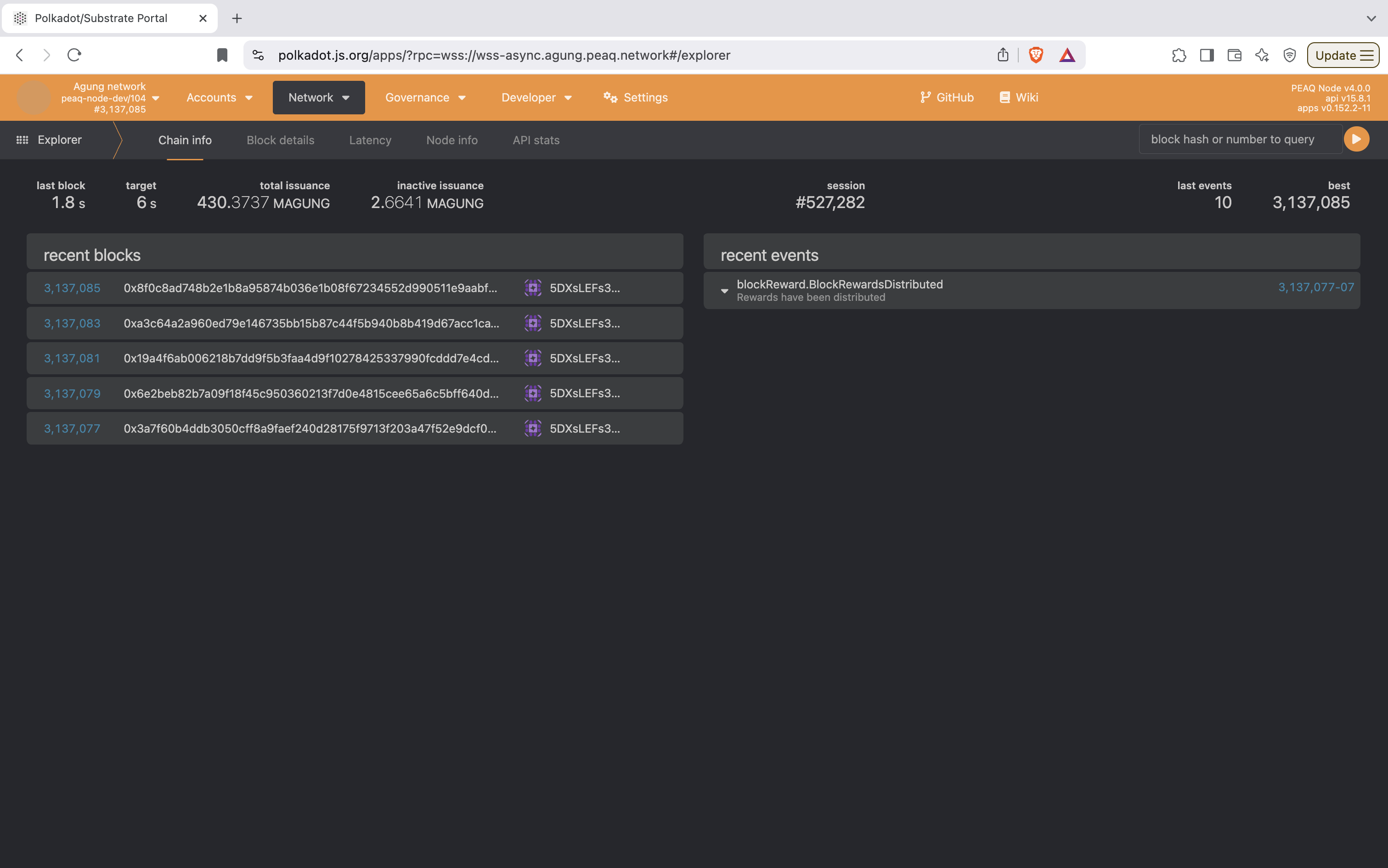
Please open up the **Polkadot.js** link referenced above. It will take you to the block explorer page for the network you selected. An image like the one displayed below will appear.
 #### Main Metrics
* **Last Block:** Indicates the time taken to produce the most recent block.
* **Target Block Time:** Displays the target block production time (`6 seconds`), showing whether the network is operating within expected parameters.
* **Total Issuance:** Represents the total supply of the network's native currency (`427.7602 MAGUNG`), reflecting overall supply dynamics.
* **Inactive Issuance:** Displays uncirculated or non-staked currency (`2.0105 MAGUNG`), potentially relevant for staking or inflation calculations.
#### Recent Blocks
* **Block List:** Shows a list of the most recently produced blocks.
* **Block Numbers:** Clicking on a block number (e.g., `3,137,077`) navigates to details about that specific block.
* **Block Hash:** Displays the unique hash for each block.
* **Validator Address:** Identifies the account or node (e.g., `5FX8TwkFy...`) responsible for producing that block.
#### Recent Events
* Displays the latest events logged on the blockchain, such as:
* **Extrinsics:** Events that are sent from the sdk or extrinsic explorer will show up here (`peaqStorage.ItemAdded`, `peaqDid.AttributeAdded`).
* **Staking Rewards:** Events like `parachainStaking.Rewarded` indicate rewards issued to validators or delegators.
* **Balance Transfers:** `balances.Transfer` shows transactions between accounts.
* **Session/Block Rewards:** Events like `session.NewSession` or `blockReward.BlockRewardsDistributed` track staking sessions or block rewards.
* **New Rounds:** `parachainStaking.NewRound` reflects the start of new staking rounds, useful for validators or nominators.
### Polkadot.js for Accounts
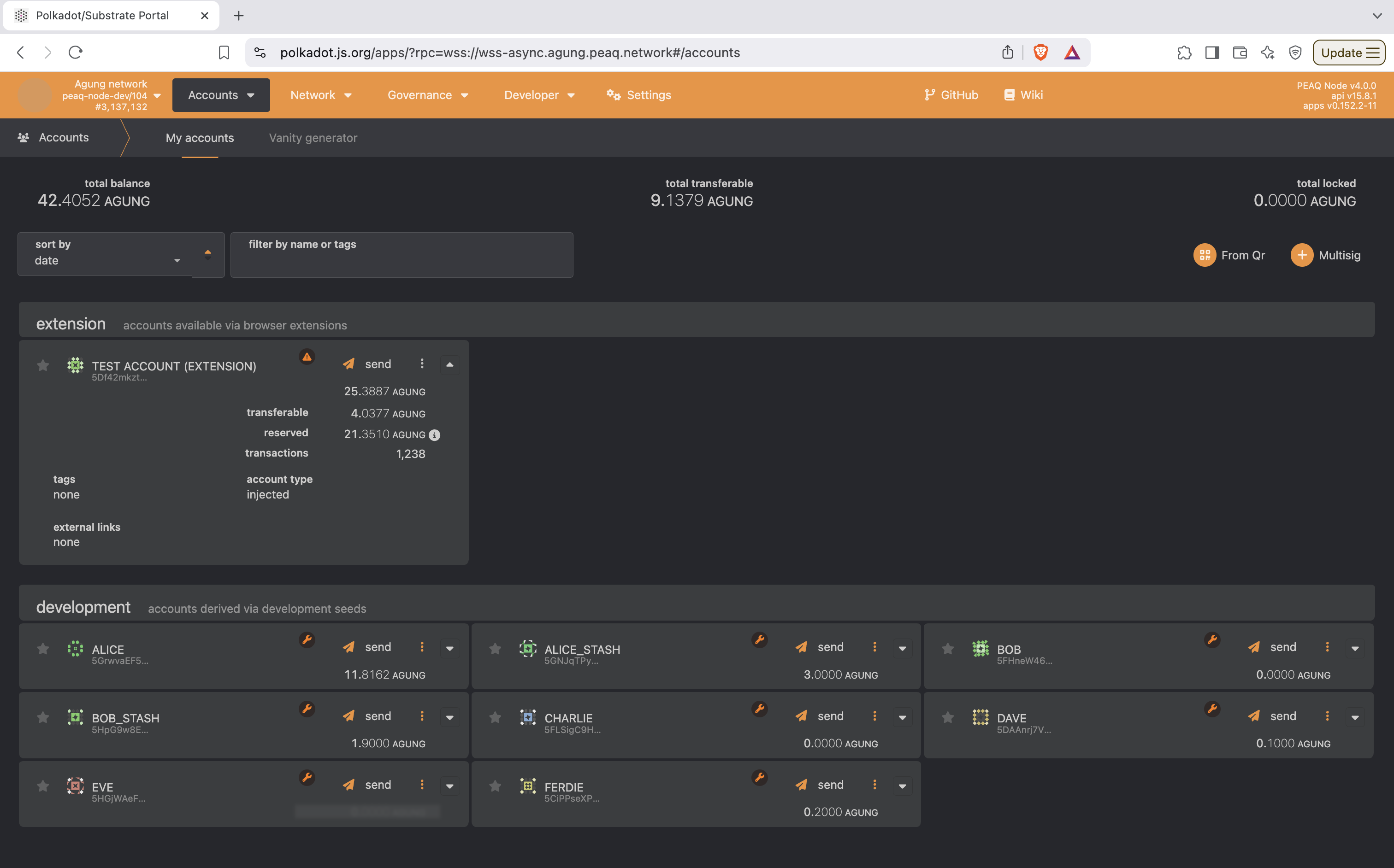
Select the **Accounts** section from the blockchain explorer interface, specifically the **"My Accounts"** tab. It provides an overview of
accounts, balances, and associated actions for managing wallet funds and interacting with the network.
#### Main Metrics
* **Last Block:** Indicates the time taken to produce the most recent block.
* **Target Block Time:** Displays the target block production time (`6 seconds`), showing whether the network is operating within expected parameters.
* **Total Issuance:** Represents the total supply of the network's native currency (`427.7602 MAGUNG`), reflecting overall supply dynamics.
* **Inactive Issuance:** Displays uncirculated or non-staked currency (`2.0105 MAGUNG`), potentially relevant for staking or inflation calculations.
#### Recent Blocks
* **Block List:** Shows a list of the most recently produced blocks.
* **Block Numbers:** Clicking on a block number (e.g., `3,137,077`) navigates to details about that specific block.
* **Block Hash:** Displays the unique hash for each block.
* **Validator Address:** Identifies the account or node (e.g., `5FX8TwkFy...`) responsible for producing that block.
#### Recent Events
* Displays the latest events logged on the blockchain, such as:
* **Extrinsics:** Events that are sent from the sdk or extrinsic explorer will show up here (`peaqStorage.ItemAdded`, `peaqDid.AttributeAdded`).
* **Staking Rewards:** Events like `parachainStaking.Rewarded` indicate rewards issued to validators or delegators.
* **Balance Transfers:** `balances.Transfer` shows transactions between accounts.
* **Session/Block Rewards:** Events like `session.NewSession` or `blockReward.BlockRewardsDistributed` track staking sessions or block rewards.
* **New Rounds:** `parachainStaking.NewRound` reflects the start of new staking rounds, useful for validators or nominators.
### Polkadot.js for Accounts
Select the **Accounts** section from the blockchain explorer interface, specifically the **"My Accounts"** tab. It provides an overview of
accounts, balances, and associated actions for managing wallet funds and interacting with the network.
 #### Account Categories
1. **Extension Accounts:**
* Accounts accessible through browser extensions (e.g., Polkadot.js, Talisman, etc.).
* **Example:** `TEST ACCOUNT (EXTENSION)` has `25.3887 AGUNG`.
* **Transferable:** Amount of tokens that can be sent to another wallet.
* **Reserved:** Amount of tokens locked after performing DID/RBAC/STORAGE operations to prevent spam. Refunded to the user after they use a remove() method to delete what they stored on-chain.
* **Transactions:** Number of transactions the account has performed.
* Actions available:
* **Send:** Transfer funds from this account to another.
2. **Development Accounts:**
* Accounts derived from seed phrases used for development purposes.
* **Example Accounts:**
* "ALICE" has `11.8386 AGUNG` available.
* Actions available:
* **Send:** Transfer funds from these accounts.
### Polkadot.js for Extrinsics
Select the **Developer** section from the blockchain explorer interface, specifically the **"Extrinsics"** tab. This interface is helpful to those who want
to understand what pallets peaq has and the capabilities they offer. It allows developers or advanced users to **manually** submit extrinsics (transactions or actions) to the blockchain.
#### Account Categories
1. **Extension Accounts:**
* Accounts accessible through browser extensions (e.g., Polkadot.js, Talisman, etc.).
* **Example:** `TEST ACCOUNT (EXTENSION)` has `25.3887 AGUNG`.
* **Transferable:** Amount of tokens that can be sent to another wallet.
* **Reserved:** Amount of tokens locked after performing DID/RBAC/STORAGE operations to prevent spam. Refunded to the user after they use a remove() method to delete what they stored on-chain.
* **Transactions:** Number of transactions the account has performed.
* Actions available:
* **Send:** Transfer funds from this account to another.
2. **Development Accounts:**
* Accounts derived from seed phrases used for development purposes.
* **Example Accounts:**
* "ALICE" has `11.8386 AGUNG` available.
* Actions available:
* **Send:** Transfer funds from these accounts.
### Polkadot.js for Extrinsics
Select the **Developer** section from the blockchain explorer interface, specifically the **"Extrinsics"** tab. This interface is helpful to those who want
to understand what pallets peaq has and the capabilities they offer. It allows developers or advanced users to **manually** submit extrinsics (transactions or actions) to the blockchain.
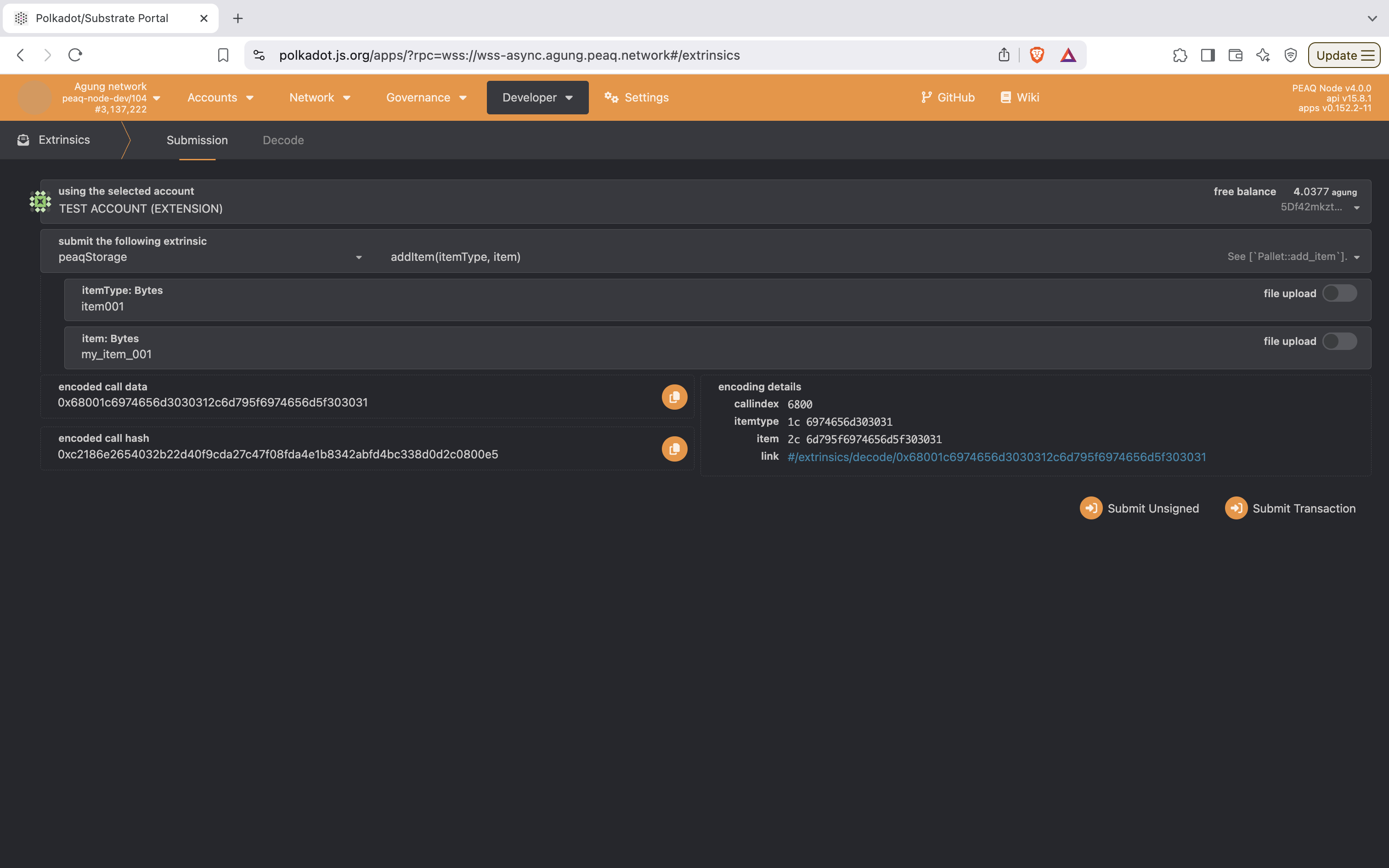 #### Key Components
1. **Using the Selected Account**
* Displays the currently selected account from which the extrinsic will be submitted.
* In this case, the account is `TEST ACCOUNT (EXTENSION)`, which has a **free balance** of `4.0377 AGUNG`.
* Users can switch accounts if they have multiple accounts configured.
2. **Submit the Following Extrinsic**
* **Pallet (Module):** `peaqStorage`
* This refers to a custom pallet/module on the peaq network. The pallet handles specific logic or functionality, related to **storage** in this case.
* **Function (Extrinsic):** `addItem(itemType, item)`
* This function allows users to add an item to storage by specifying:
* `itemType` (Bytes): Indicates the type or category of the item being stored (e.g., a label or identifier).
* `item` (Bytes): The actual data or item being stored (e.g., a name, value, or identifier string).
3. **Input Fields**
* **itemType (Bytes):** The user has entered `item001` as the type of the stored item.
* **item (Bytes):** The user has entered `my_item_001` as the data or value to be stored.
* These values will be encoded as hex bytes for submission to the blockchain.
* **Encoded Call Data**
* Displays the encoded transaction data to be sent to the blockchain.
* Example: `0x6800106974656d2c6d795f6974656d5f313233`
* This is the byte-encoded representation of the `addItem` extrinsic with its arguments.
* **Encoded Call Hash**
* A hash of the encoded call data: `0x30a89710e6440564c741b061c84cc328948b7d21869b70e24315191bd69771c`.
* This hash is unique to this specific extrinsic and can be used for reference or validation purposes.
* **Encoding Details**
* **callIndex:** `6800` - Identifies the pallet and function within the runtime.
* **itemType (Hex):** `6974656d303031` - Hex-encoded version of the input `itemType` ("item001").
* **item (Hex):** `6d795f6974656d5f303031` - Hex-encoded version of the input `item` ("my\_item\_001").
* **Link:** Provides a URL for decoding the extrinsic for validation.
* **Submission Options**
* **Submit Unsigned:** Submit the transaction without signing it, typically used for testing purposes.
* **Submit Transaction:** Sends the transaction as a signed extrinsic from the selected account.
#### Send Extrinsic
After reading through and getting a deeper understanding of the pallet that you are using, you are free to use it to send a transaction.
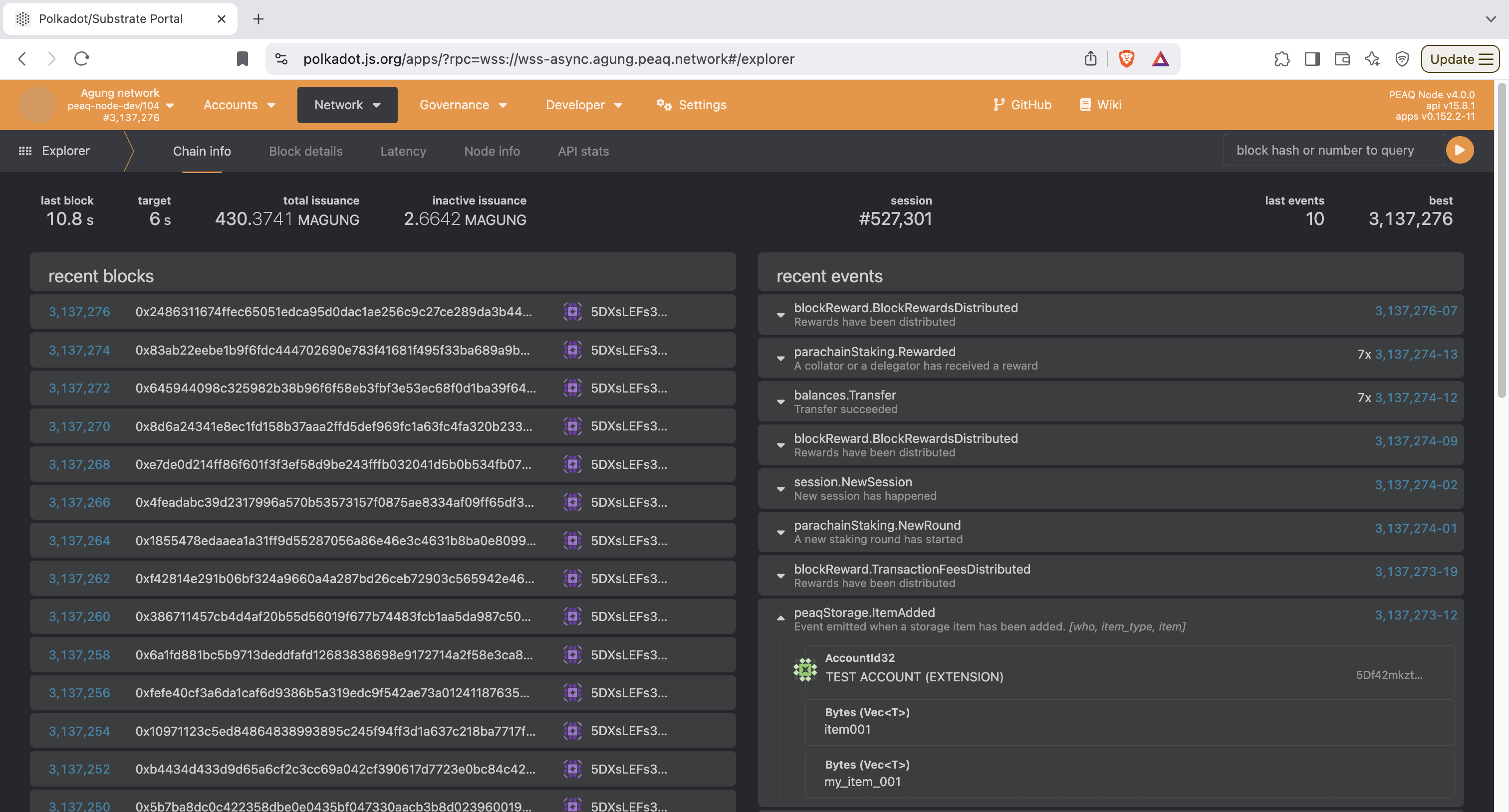
1. In another tab, select the **Network** tab and click on the **Explorer** section. This will bring you to the block explorer page so you can see the extrinsic you send be appended on chain.
2. In your main tab open up the **Extrinsics** page. Create a transaction similar to the one above to store data at `peaqStorage`. Once you have connected your account and filled the pallet with relevant data, please click on the **Submit Transaction** button on the bottom right.
1. **Sign** the transaction with your password.
2. A **green checkmark** will appear in the upper right corner when it has been submitted to the chain.
3. Go back to the **Explorer** page. After a couple seconds the extrinsic event you submitted will be appended. You can click on the block number on the right hand side to view more information about the transaction.
#### Key Components
1. **Using the Selected Account**
* Displays the currently selected account from which the extrinsic will be submitted.
* In this case, the account is `TEST ACCOUNT (EXTENSION)`, which has a **free balance** of `4.0377 AGUNG`.
* Users can switch accounts if they have multiple accounts configured.
2. **Submit the Following Extrinsic**
* **Pallet (Module):** `peaqStorage`
* This refers to a custom pallet/module on the peaq network. The pallet handles specific logic or functionality, related to **storage** in this case.
* **Function (Extrinsic):** `addItem(itemType, item)`
* This function allows users to add an item to storage by specifying:
* `itemType` (Bytes): Indicates the type or category of the item being stored (e.g., a label or identifier).
* `item` (Bytes): The actual data or item being stored (e.g., a name, value, or identifier string).
3. **Input Fields**
* **itemType (Bytes):** The user has entered `item001` as the type of the stored item.
* **item (Bytes):** The user has entered `my_item_001` as the data or value to be stored.
* These values will be encoded as hex bytes for submission to the blockchain.
* **Encoded Call Data**
* Displays the encoded transaction data to be sent to the blockchain.
* Example: `0x6800106974656d2c6d795f6974656d5f313233`
* This is the byte-encoded representation of the `addItem` extrinsic with its arguments.
* **Encoded Call Hash**
* A hash of the encoded call data: `0x30a89710e6440564c741b061c84cc328948b7d21869b70e24315191bd69771c`.
* This hash is unique to this specific extrinsic and can be used for reference or validation purposes.
* **Encoding Details**
* **callIndex:** `6800` - Identifies the pallet and function within the runtime.
* **itemType (Hex):** `6974656d303031` - Hex-encoded version of the input `itemType` ("item001").
* **item (Hex):** `6d795f6974656d5f303031` - Hex-encoded version of the input `item` ("my\_item\_001").
* **Link:** Provides a URL for decoding the extrinsic for validation.
* **Submission Options**
* **Submit Unsigned:** Submit the transaction without signing it, typically used for testing purposes.
* **Submit Transaction:** Sends the transaction as a signed extrinsic from the selected account.
#### Send Extrinsic
After reading through and getting a deeper understanding of the pallet that you are using, you are free to use it to send a transaction.
1. In another tab, select the **Network** tab and click on the **Explorer** section. This will bring you to the block explorer page so you can see the extrinsic you send be appended on chain.
2. In your main tab open up the **Extrinsics** page. Create a transaction similar to the one above to store data at `peaqStorage`. Once you have connected your account and filled the pallet with relevant data, please click on the **Submit Transaction** button on the bottom right.
1. **Sign** the transaction with your password.
2. A **green checkmark** will appear in the upper right corner when it has been submitted to the chain.
3. Go back to the **Explorer** page. After a couple seconds the extrinsic event you submitted will be appended. You can click on the block number on the right hand side to view more information about the transaction.
 #### Read Extrinsic
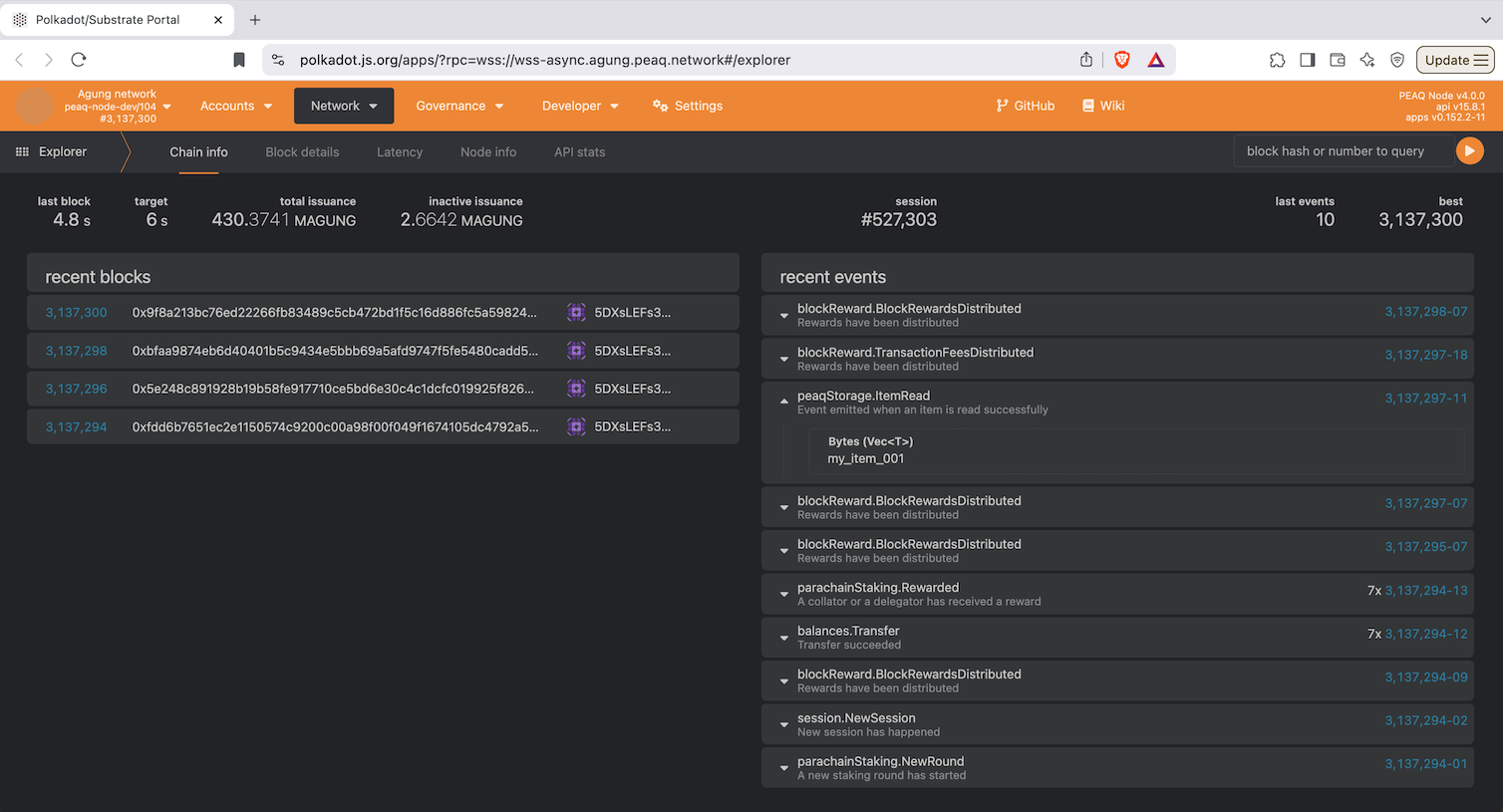
Once a peaq storage transaction has been sent, you can also use the **Extrinsic Developer** section to read the data you added.
1. Open the **Polkadot.js Explorer** page
2. Select **peaqStorage getItem()** on the extrinsic page.
3. Submit the same itemType as what you just stored (e.g. `item`).
4. Sign transaction
5. Go to explorer to see the **ItemRead** return item.
#### Read Extrinsic
Once a peaq storage transaction has been sent, you can also use the **Extrinsic Developer** section to read the data you added.
1. Open the **Polkadot.js Explorer** page
2. Select **peaqStorage getItem()** on the extrinsic page.
3. Submit the same itemType as what you just stored (e.g. `item`).
4. Sign transaction
5. Go to explorer to see the **ItemRead** return item.
 As you can see the **Polkadot.js Explorer** is a powerful tool for interacting directly with the blockchain, offering advanced features like submitting, reading, and analyzing extrinsics.
However, for users who need a more streamlined and user-friendly experience to simply monitor on-chain activity, analyze transaction histories, or explore account
details without diving into the complexities of extrinsics, the **Subscan Explorer** becomes an invaluable resource.
## Subscan
Now we will explore **Subscan**. This explorer focuses on pre-indexed, easily accessible data. This makes it particularly useful for non-technical users or those who want a high-level view
of blockchain activity without dealing with the complexities of runtime calls and extrinsics.
Subscan also provides enhanced features like **account and contract lookups**, **detailed transaction filtering**, and **historical data exploration**, which Polkadot.js does not offer in as streamlined a manner.
### Using Subscan
1. **Visit Subscan's peaq Explorer.**
* Using the table above, go to the Subscan explorer you would like to use (agung in these examples).
* The dashboard provides a high-level overview of the network, including key metrics like finalized blocks, signed extrinsics, and active accounts.
2. **Search for Accounts or Contracts**
* In the search bar enter an **account address** or **contract address** to quickly locate its details.
**Example of an account search:** The account above was searched by inputting `0x9Eeab1aCcb1A701aEfAB00F3b8a275a39646641C` in the search bar. **Subscan** returned the account that is affiliated with this address.
As you can see the **Polkadot.js Explorer** is a powerful tool for interacting directly with the blockchain, offering advanced features like submitting, reading, and analyzing extrinsics.
However, for users who need a more streamlined and user-friendly experience to simply monitor on-chain activity, analyze transaction histories, or explore account
details without diving into the complexities of extrinsics, the **Subscan Explorer** becomes an invaluable resource.
## Subscan
Now we will explore **Subscan**. This explorer focuses on pre-indexed, easily accessible data. This makes it particularly useful for non-technical users or those who want a high-level view
of blockchain activity without dealing with the complexities of runtime calls and extrinsics.
Subscan also provides enhanced features like **account and contract lookups**, **detailed transaction filtering**, and **historical data exploration**, which Polkadot.js does not offer in as streamlined a manner.
### Using Subscan
1. **Visit Subscan's peaq Explorer.**
* Using the table above, go to the Subscan explorer you would like to use (agung in these examples).
* The dashboard provides a high-level overview of the network, including key metrics like finalized blocks, signed extrinsics, and active accounts.
2. **Search for Accounts or Contracts**
* In the search bar enter an **account address** or **contract address** to quickly locate its details.
**Example of an account search:** The account above was searched by inputting `0x9Eeab1aCcb1A701aEfAB00F3b8a275a39646641C` in the search bar. **Subscan** returned the account that is affiliated with this address.
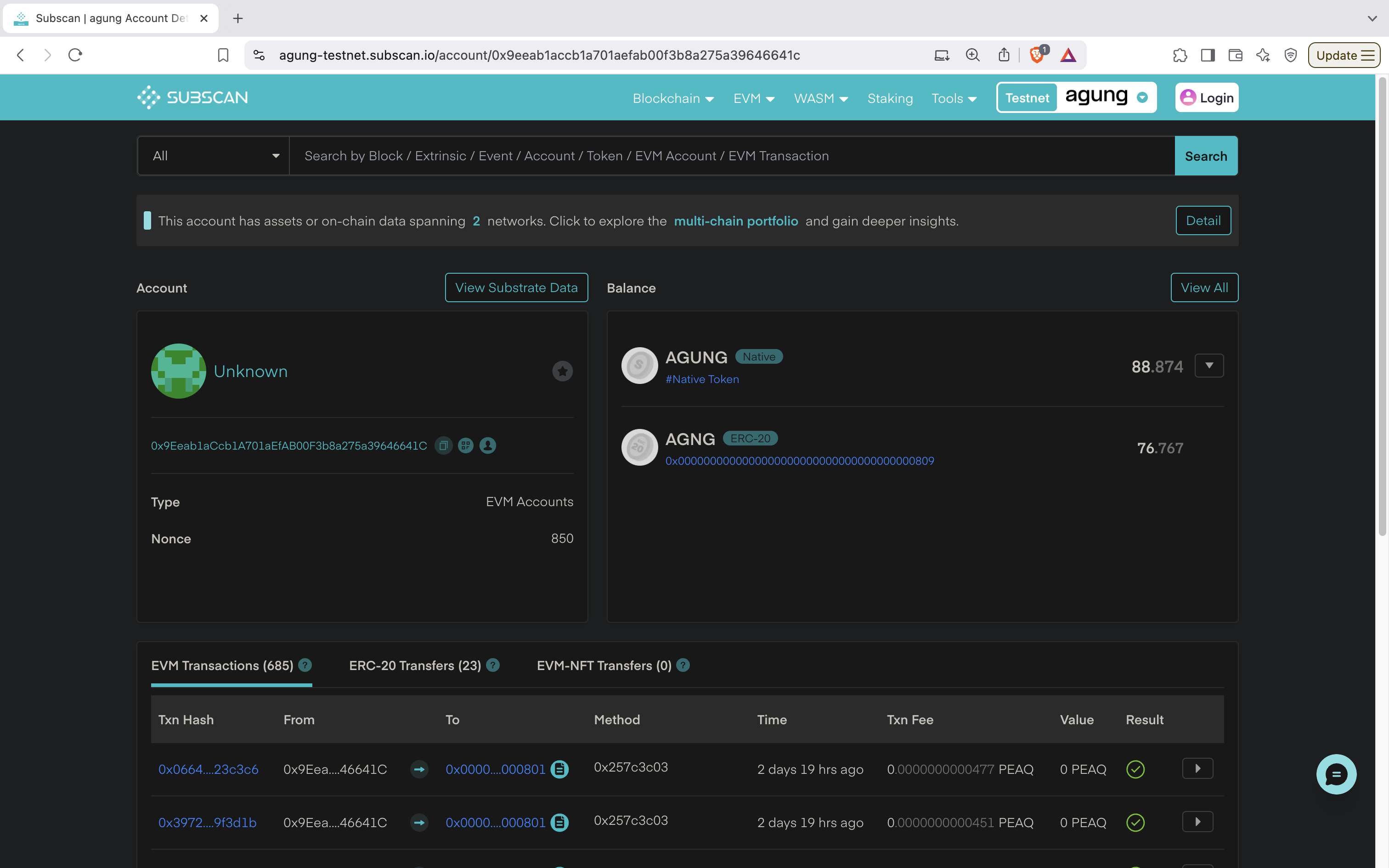 #### Account Details
* **Account**: Includes the *address* of the account and the *nonce* which represents the number of transactions sent from this account.
* **Balance:** Displays the amount of the native token an account has. Shows how much is transferable and how much is reserved (during pallet usage).
* **EVM Transactions**:
* Displays a list of transactions submitted by this account to the blockchain.
* Each EVM Transaction contains the following:
* **Tx Hash:** `0x0664....23c3c6` - The unique transaction hash used to identify this tx.
* **From:** `0x9Eea....46641C` - Account used to send the tx.
* **To:** `0x0000....000801` - Where the transaction was sent to (RBAC precompile in this case).
* **Method:** `0x257c3c03` - Function method executed on the Smart Contract (human-readable when contract is verified).
* **Time:** `2 days 19 hrs ago` - Indicates when the tx was added to the blockchain.
* **Txn Fee:** `0.0000000000477PEAQ` - Cost to send the tx.
* **Value:** `0.0000000000477PEAQ` - Amount of native token that was transferred during the operation.
* **Result:** ✅ - Indicates that the extrinsic was successfully executed.
* **ERC-20 Transfers**: Shows the fund transfers initiated by this account.
* **EVM-NFT Transfers History:** Shows the NFT transfers initiated by this account.
#### Account Details
* **Account**: Includes the *address* of the account and the *nonce* which represents the number of transactions sent from this account.
* **Balance:** Displays the amount of the native token an account has. Shows how much is transferable and how much is reserved (during pallet usage).
* **EVM Transactions**:
* Displays a list of transactions submitted by this account to the blockchain.
* Each EVM Transaction contains the following:
* **Tx Hash:** `0x0664....23c3c6` - The unique transaction hash used to identify this tx.
* **From:** `0x9Eea....46641C` - Account used to send the tx.
* **To:** `0x0000....000801` - Where the transaction was sent to (RBAC precompile in this case).
* **Method:** `0x257c3c03` - Function method executed on the Smart Contract (human-readable when contract is verified).
* **Time:** `2 days 19 hrs ago` - Indicates when the tx was added to the blockchain.
* **Txn Fee:** `0.0000000000477PEAQ` - Cost to send the tx.
* **Value:** `0.0000000000477PEAQ` - Amount of native token that was transferred during the operation.
* **Result:** ✅ - Indicates that the extrinsic was successfully executed.
* **ERC-20 Transfers**: Shows the fund transfers initiated by this account.
* **EVM-NFT Transfers History:** Shows the NFT transfers initiated by this account.
**Example of a contract search:** The contract was found by submitting the deployed contract address of `0x17bD3d6639b28Ee774040D3aE2137F49390a584c` in the **Subscan** search bar. It took me to the page:
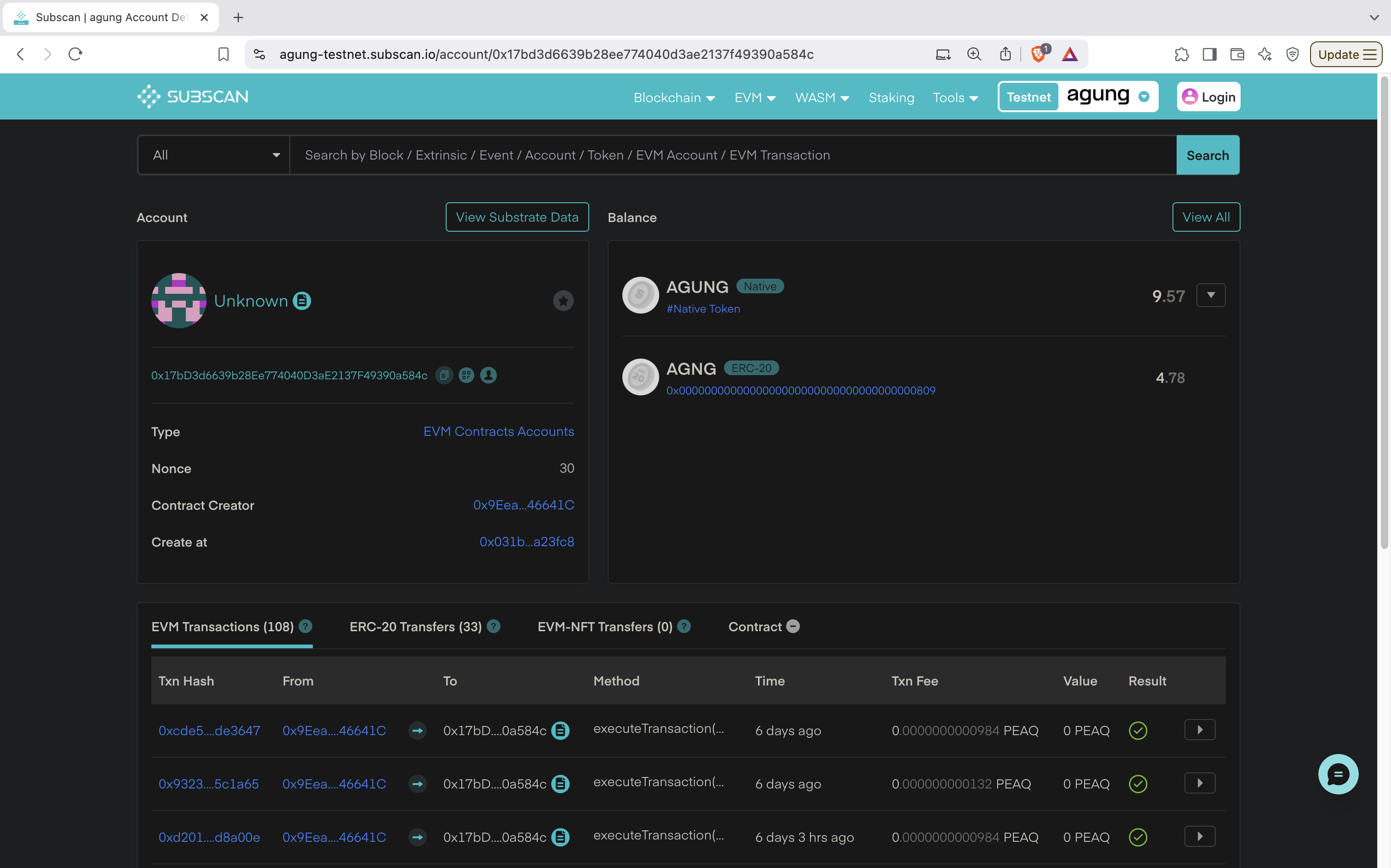 #### Contract Details
* **Account**:
* **Unknown:** Indicates the account hasn't been assigned a custom or recognizable name by the user.
* **Account Address:** Unique identifier of the EVM contract.
* **Type:** EVM-based account, meaning it's a smart contract account created and executed within the EVM environment.
* **Nonce**: Indicates that this contract account has performed `30` transactions so far.
* **Contract Creator:** The EVM address of the account that deployed this contract.
* **Created At:** Refers to the transaction hash where this contract was initially deployed.
* **Balance:**
* **Total Balance:** `9.57 AGUNG` – The contract currently has native AGUNG tokens.
* **Transaction Details:**
* **EVM Transactions (685):** Tracks interactions with this EVM contract.
* **Txn Hash:** `0xcde5....de3647` - The unique identifier for the transaction involving this contract. Clicking this link shows more details about the transaction.
* **From:** `0x9Eea...46641C` - The address of the sender who interacted with the contract (contract creator in this case).
* **To:** `0x17bD....0a584c` - The address of this contract, which received the transaction.
* **Method:** `executeTransaction()` - The method or function called within the contract.
* **Time:** `6 days ago` - Indicates when this transaction was processed.
* **Txn Fee:** `0.0000000000984PEAQ` - The transaction fee paid for executing this transaction on the network.
* **Value:** `0 PEAQ` - No value (native tokens) was transferred with this transaction.
* **Result:** ✅ - Indicates that the transaction was successfully executed.
* **ERC-20 Transfers (22):** Indicates no transfers of ERC-20 tokens (standard fungible tokens) related to this contract.
* **ERC-721 Transfers (0):** Indicates no transfers of ERC-721 tokens (standard NFTs) related to this contract.
* **Contract:** Includes details on how to verify a contract.
## Summary
The **peaqscan**, **Blockscout**, **Polkadot.js**, and **Subscan** explorers are essential tools for interacting with and analyzing the peaq blockchain ecosystem. Each tool serves different purposes and caters to different audiences:
* **peaqscan**:
* Primary choice for **EVM debugging, simulation, and developer analytics** on peaq. With execution traces, revert reasons, gas profiling, forks, and monitoring, it streamlines building and troubleshooting on peaq mainnet and testnet.
* **Blockscout Explorer**:
* Great for **EVM lookups** and **contract verification**, with readable logs and token/NFT activity.
* **Polkadot.js Explorer**:
* Ideal for **Substrate pallet interactions** and **real-time extrinsic development/testing**.
* **Subscan Explorer**:
* Best for **high-level overviews** and **historical analysis** with searchable, pre-indexed data.
#### Contract Details
* **Account**:
* **Unknown:** Indicates the account hasn't been assigned a custom or recognizable name by the user.
* **Account Address:** Unique identifier of the EVM contract.
* **Type:** EVM-based account, meaning it's a smart contract account created and executed within the EVM environment.
* **Nonce**: Indicates that this contract account has performed `30` transactions so far.
* **Contract Creator:** The EVM address of the account that deployed this contract.
* **Created At:** Refers to the transaction hash where this contract was initially deployed.
* **Balance:**
* **Total Balance:** `9.57 AGUNG` – The contract currently has native AGUNG tokens.
* **Transaction Details:**
* **EVM Transactions (685):** Tracks interactions with this EVM contract.
* **Txn Hash:** `0xcde5....de3647` - The unique identifier for the transaction involving this contract. Clicking this link shows more details about the transaction.
* **From:** `0x9Eea...46641C` - The address of the sender who interacted with the contract (contract creator in this case).
* **To:** `0x17bD....0a584c` - The address of this contract, which received the transaction.
* **Method:** `executeTransaction()` - The method or function called within the contract.
* **Time:** `6 days ago` - Indicates when this transaction was processed.
* **Txn Fee:** `0.0000000000984PEAQ` - The transaction fee paid for executing this transaction on the network.
* **Value:** `0 PEAQ` - No value (native tokens) was transferred with this transaction.
* **Result:** ✅ - Indicates that the transaction was successfully executed.
* **ERC-20 Transfers (22):** Indicates no transfers of ERC-20 tokens (standard fungible tokens) related to this contract.
* **ERC-721 Transfers (0):** Indicates no transfers of ERC-721 tokens (standard NFTs) related to this contract.
* **Contract:** Includes details on how to verify a contract.
## Summary
The **peaqscan**, **Blockscout**, **Polkadot.js**, and **Subscan** explorers are essential tools for interacting with and analyzing the peaq blockchain ecosystem. Each tool serves different purposes and caters to different audiences:
* **peaqscan**:
* Primary choice for **EVM debugging, simulation, and developer analytics** on peaq. With execution traces, revert reasons, gas profiling, forks, and monitoring, it streamlines building and troubleshooting on peaq mainnet and testnet.
* **Blockscout Explorer**:
* Great for **EVM lookups** and **contract verification**, with readable logs and token/NFT activity.
* **Polkadot.js Explorer**:
* Ideal for **Substrate pallet interactions** and **real-time extrinsic development/testing**.
* **Subscan Explorer**:
* Best for **high-level overviews** and **historical analysis** with searchable, pre-indexed data.