> ## Documentation Index
> Fetch the complete documentation index at: https://docs.peaq.xyz/llms.txt
> Use this file to discover all available pages before exploring further.
# x402 on peaq
**x402 enables blockchain-based micropayments over HTTPS, using the HTTP 402 Payment Required status code to gate access to APIs,
digital content and machine-to-machine interactions, rather than traditional authentication or subscription systems.**
With x402, a client can make an API request and automatically be prompted to authorize payment using any supported **ERC-3009** token on peaq,
such as **USDC** or **bridged stgUSDT**. Once the facilitator confirms the payment transaction on-chain (via delegated or self-hosted verification),
access is granted instantly, no account creation or manual verification required.
In this guide, you'll learn how to implement a full x402 payment flow on peaq, using **Express** and **TypeScript**. You'll build the following components:
1. **Facilitator** - verifies and broadcasts the payment on-chain
2. **Resource Server** - defines which tokens are accepted and which APIs require payment
3. **Client(s)** - initiates payments and accesses paid endpoints, either through an automated backend wallet representing a machine identity, or a web wallet like MetaMask
These components map directly to the x402 standard roles of Verifier (Facilitator), Resource Provider (Resource Server), and Client (Consumer).
This setup demonstrates both **machine-to-machine** and **human-to-API** interactions. On peaq, machines can sign and authorize x402 transactions using
their on-chain identity keys, enabling autonomous payment flows between themselves.
# Native Integration
In the following sections, we'll walk through a native integration on peaq, demonstrating how the payment negotiation and verification flow can be implemented directly on-chain.
## Facilitator
The facilitator is responsible for verifying payment authorization and broadcasting transactions to the peaq blockchain. It acts as the verification layer between the client's
signed request and the resource's API logic.
There are two modes of operation:
* **Delegated Verification**
The resource server delegates payment verification to an external facilitator running on peaq. The facilitator validates transaction proofs and returns a signed receipt via HTTPS.
This is ideal for smaller resource servers that prefer not to run blockchain nodes. For example, PayAI provides a hosted facilitator supporting peaq at: `https://facilitator.payai.network`.
Please checkout the [x402 Facilitator List](https://www.x402.org/ecosystem?category=facilitators) for more providers.
* **Self-Hosted Verification**
The resource server deploys a facilitator service connected directly to peaq RPC node. This enables local validation of payment proofs and full control over on-chain interactions.
While more complex, this reduces reliance on external services and grants full control over signing, verification, and transaction lifecycle management. It's the preferred
configuration for enterprise or high-throughput API systems.
## Resource Server
The resource server exposes one or more API endpoints protected by x402. When a client requests a protected resource, the server responds with a `402 Payment Required` response.
The resource server specifies payment requirements per endpoint, including accepted EIP-3009 tokens using contract address and pricing units. These settings
determine when the HTTP 402 response is triggered.
Once the payment is confirmed via the facilitator, the resource server grants access and returns the API response. This layer bridges the facilitator verification with client authorization.
## Client
Clients can be human users interacting through web wallets like MetaMask or Rabby, or autonomous agents using backend wallets linked to peaq machine identities. These clients sign and broadcast
payment transactions as specified in the `Payment-Request` header, then resubmit the original API call with a `Payment-Receipt` proving settlement.
We'll demonstrate the full flow with two example clients:
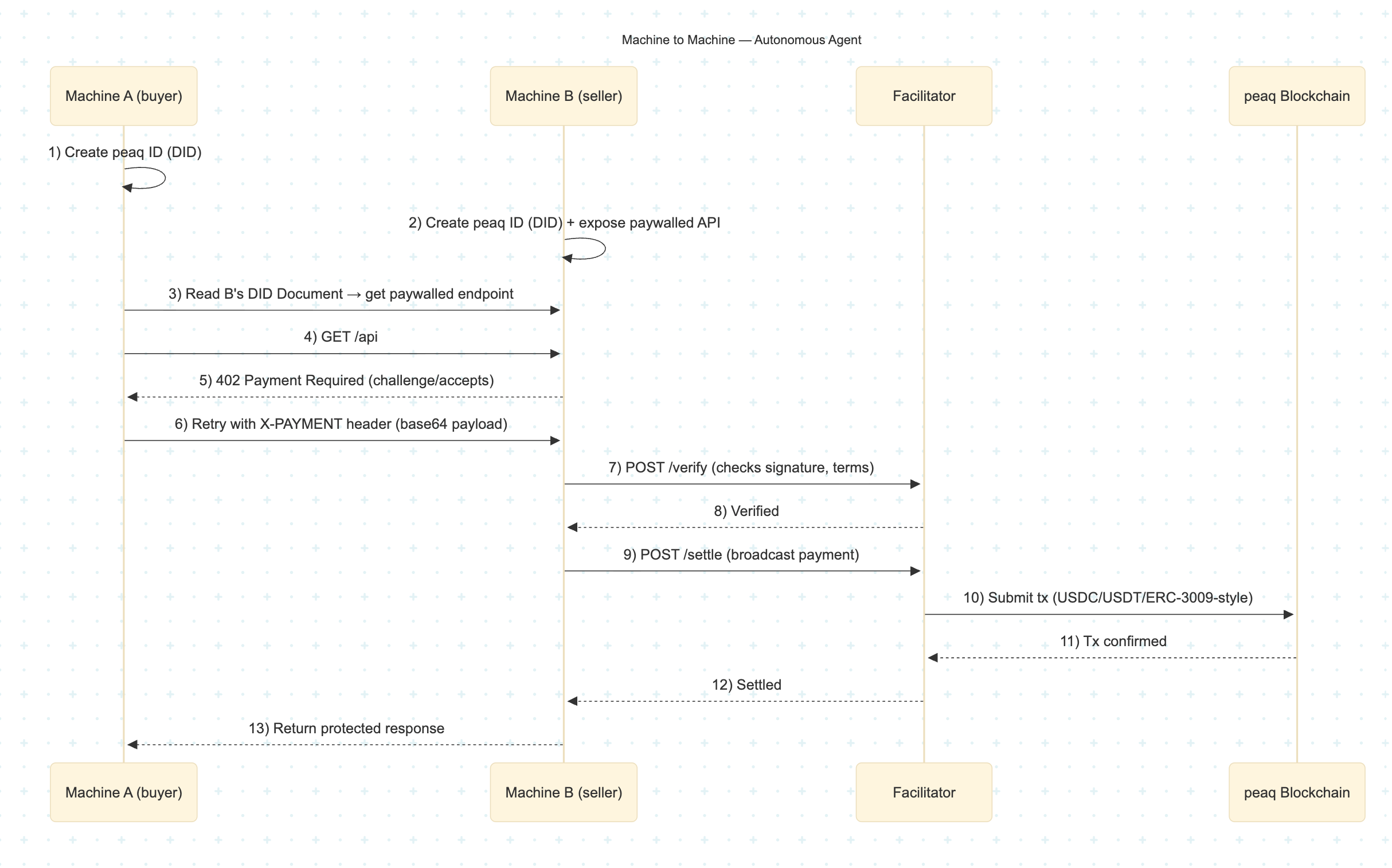
* **Backend Autonomous Agent** - a programmatic client (with its own private key/machine identity) signs the authorization automatically, representing a “machine paying a machine” flow.
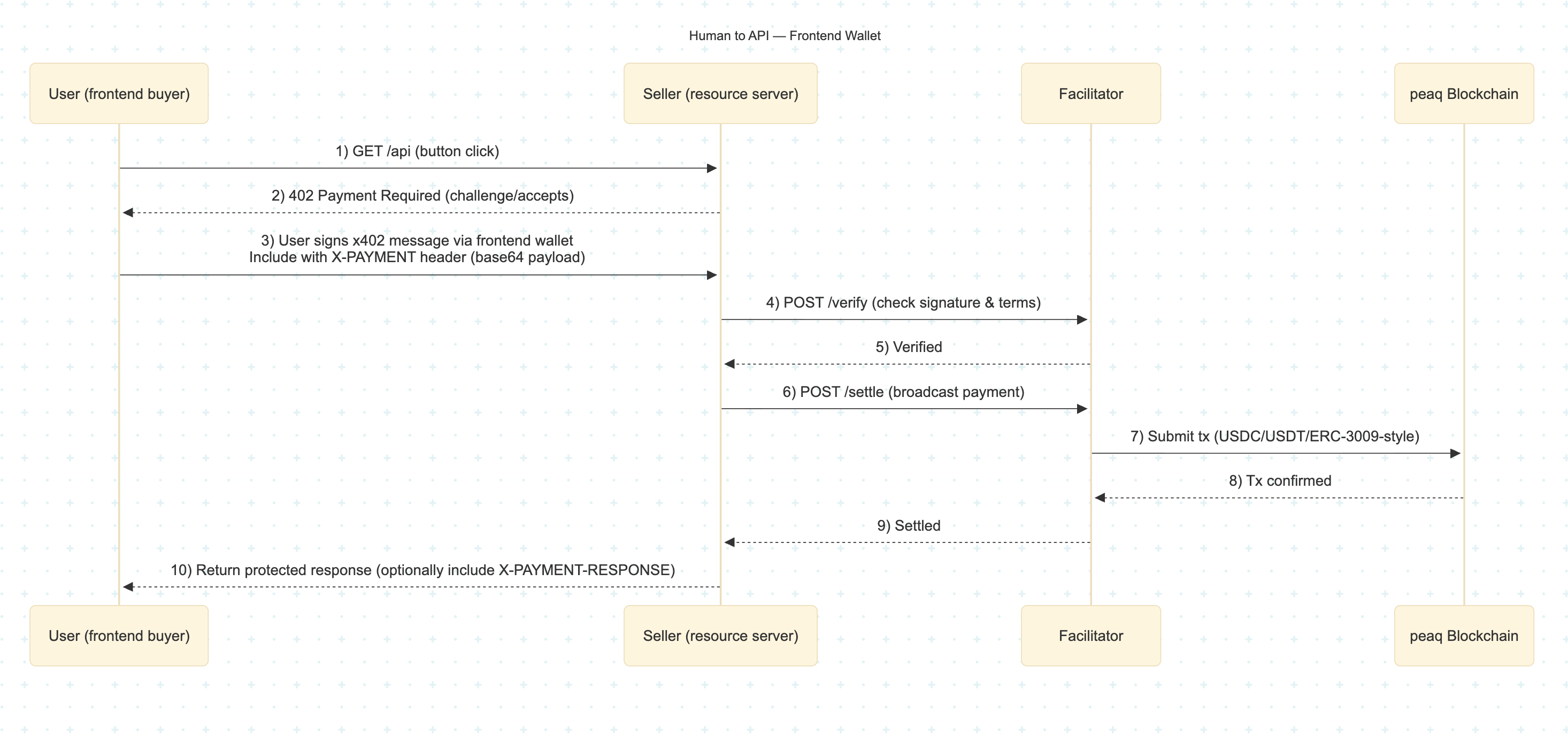
 * **Frontend User (MetaMask)** - a human user signs a payment authorization using their wallet to unlock an API feature.
 ## Project setup
The [x402-peaq repository](https://github.com/peaqnetwork/x402-peaq/tree/dev) contains the complete implementation examples for:
* **Facilitator**
* **Resource Server**
* **Clients (frontend + backend)**
Each component below includes a code snippet and short explanation to help you understand the core logic without leaving this page.
You can clone the repository and follow the instructions in the **README.md** file to get started.
### Facilitator
Code Snippet:
```Typescript theme={"theme":{"light":"github-light-default","dark":"github-dark"}}
import express from "express";
import { config } from "dotenv";
import { verify, settle } from "x402/facilitator";
import {
PaymentRequirementsSchema,
PaymentPayloadSchema,
createConnectedClient,
createSigner,
SupportedEVMNetworks,
} from "x402/types";
config();
const app = express();
app.use(express.json());
app.post("/verify", async (req, res) => {
try {
const paymentRequirements = PaymentRequirementsSchema.parse(req.body.paymentRequirements);
const paymentPayload = PaymentPayloadSchema.parse(req.body.paymentPayload);
const client = createConnectedClient(paymentRequirements.network);
const valid = await verify(client, paymentPayload, paymentRequirements);
res.json(valid);
} catch (err) {
res.status(400).json({ error: "Invalid request" });
}
});
app.post("/settle", async (req, res) => {
try {
const signer = await createSigner(
req.body.paymentRequirements.network,
process.env.FACILITATOR_PRIVATE_KEY!
);
const tx = await settle(signer, req.body.paymentPayload, req.body.paymentRequirements);
res.json(tx);
} catch (err) {
res.status(400).json({ error: "Settlement failed" });
}
});
app.listen(4020, () => console.log("Facilitator running on http://localhost:4020"));
```
#### Explanation
* `verify()` - checks if the client's signed authorization is valid for the given payment terms.
* `settle()` - broadcasts the authorized payment on-chain once verified.
* `PaymentRequirementsSchema` / `PaymentPayloadSchema` - ensure incoming data follows the x402 spec.
* `createSigner()` - connects the facilitator's private key to the correct peaq RPC endpoint.
### Resource Server
USDC Code Snippet:
```Typescript theme={"theme":{"light":"github-light-default","dark":"github-dark"}}
import { config } from "dotenv";
import express from "express";
import { paymentMiddleware, type Resource } from "x402-express";
config();
const facilitatorUrl = process.env.FACILITATOR_URL as Resource; // e.g., "https://facilitator.payai.network"
const payTo = process.env.MACHINE_B_ADDRESS as `0x${string}`; // receiver on peaq
const port = process.env.SERVER_PORT ?? "4021";
const app = express();
// Protect routes with x402
app.use(
// USDC on peaq (human-readable pricing)
paymentMiddleware(
payTo,
{
"GET /data": {
price: "$0.01", // 1 cent in USDC
network: "peaq",
},
},
{ url: facilitatorUrl }
)
);
// Protected API: returns “secret” machine data once paid
app.get("/data", (_req, res) => {
res.json({ report: { machine: "machine B", data: "secret data" } });
});
app.listen(port, () => {
console.log(`Resource Server listening at http://localhost:${port}`);
});
```
USDT Code Snippet:
```Typescript theme={"theme":{"light":"github-light-default","dark":"github-dark"}}
import { config } from "dotenv";
import express from "express";
import { paymentMiddleware, type Resource } from "x402-express";
config();
const facilitatorUrl = process.env.FACILITATOR_URL as Resource;
const payTo = process.env.MACHINE_B_ADDRESS as `0x${string}`;
const port = process.env.SERVER_PORT ?? "4021";
const app = express();
// Protect routes with x402 — stgUSDT (atomic units)
app.use(
paymentMiddleware(
payTo,
{
"GET /data": {
price: {
amount: "10000", // atomic units (10,000 = 0.01 for 6 decimals)
asset: {
decimals: 6,
address: "0xf4d9235269a96aadafc9adae454a0618ebe37949", // stgUSDT on peaq
eip712: { name: "Bridged stgUSDT", version: "1" },
},
},
network: "peaq",
},
},
{ url: facilitatorUrl }
)
);
// Protected API
app.get("/data", (_req, res) => {
res.json({ report: { machine: "machine B", data: "secret data" } });
});
app.listen(port, () => {
console.log(`Resource Server listening at http://localhost:${port}`);
});
```
#### Explanation
* `paymentMiddleware(payTo, rules, { url })` - protects routes with x402. On first request returns 402 Payment Required with how-to-pay details; after payment + receipt, it lets the request through.
* `payTo` - the receiver address on peaq (e.g., your machine or service wallet) that will receive funds.
* `rules map` - keys like "METHOD /path" (e.g., "GET /data") define which endpoints require payment and at what price/network.
* `Human-price format` - price: "\$0.01" (USDC on peaq); easy to read and configure for standard ERC-3009 tokens.
* `Atomic-price format` - price: `{ amount, asset }` for custom tokens (e.g., stgUSDT). Include `asset.address`, `asset.decimals`, and optional `eip712 { name, version }`.
* `network` - which chain to use (here: "peaq"). Must align with the client and facilitator.
* `{ url: facilitatorUrl }` - points to your Facilitator (delegated or self-hosted) that verifies/settles the payment.
* `app.get("/data", ...)` - your protected handler. It only runs after a valid payment receipt is presented on the retried request.
* `Env vars` - FACILITATOR\_URL, MACHINE\_B\_ADDRESS, SERVER\_PORT; keep the client's displayed price in sync with the server rule.
### Clients
Code Snippet:
```Typescript theme={"theme":{"light":"github-light-default","dark":"github-dark"}}
import { createWalletClient, http } from "viem";
import { privateKeyToAccount } from "viem/accounts";
import { peaq } from "viem/chains"; // or the chain you use (peaq/custom)
import { wrapFetchWithPayment } from "x402-fetch";
// private key for Machine A that buys data from Machine B using USDC set in the server file
const MACHINE_A_PRIVATE = process.env.MACHINE_A_PRIVATE_KEY!;
// Create a wallet client
const account = privateKeyToAccount(MACHINE_A_PRIVATE as `0x${string}`);
const client = createWalletClient({
account,
transport: http(),
chain: peaq,
});
// Wrap the fetch function with payment handling
const fetchWithPay = wrapFetchWithPayment(fetch, client, 200000); // can define macValue in 3rd parameter. We set ours as $0.20 USDC
// Make a request that may require payment
const response = await fetchWithPay(url, {
method: "GET",
});
const paymentResponseHeader = response.headers.get("X-PAYMENT-RESPONSE");
if (!paymentResponseHeader) throw new Error("No payment response header");
const settlement = JSON.parse(atob(paymentResponseHeader));
const data = await response.json();
```
#### Explanation
* `privateKeyToAccount(MACHINE_A_PRIVATE)` - loads the machine identity (Machine A) as an EOA used to sign x402 authorizations on peaq.
* `createWalletClient({ account, transport: http(), chain: peaq })` - creates a viem wallet client bound to peaq for signing the EIP-3009 style payment authorization.
* `wrapFetchWithPayment(fetch, client, 200000)` - decorates fetch so that when a 402 Payment Required is returned, it:
* reads the x402 payment requirements from the response
* signs an authorization with client
* sends it to the facilitator for verification/settlement
* retries the original request with a Payment-Receipt.
The 3rd argument caps the max value you're willing to authorize (here, “\$0.20 USDC” represented in atomic units set by your integration).
* `await fetchWithPay(url, { method: "GET" })` - performs the request; if payment is needed, the wrapper handles the pay-then-retry flow automatically.
* `response.headers.get("X-PAYMENT-RESPONSE")` - base64-encoded JSON “settlement receipt” returned by your server after successful payment; decode to inspect tx details.
* `await response.json()` - the actual protected resource payload (e.g., machine data) you wanted after settlement.
## Conclusion
With these three components - **Facilitator**, **Resource Server**, and **Client** - you now have a complete, native x402 payment flow on peaq.
This setup enables secure, account-less micropayments for APIs, data streams, and machine interactions.
To go deeper, explore the full examples and advanced configuration options in
the [x402-peaq repository](https://github.com/peaqnetwork/x402-peaq/tree/dev) and the
for more facilitator urls checkout the [x402 Facilitator List](https://www.x402.org/ecosystem?category=facilitators).
## Project setup
The [x402-peaq repository](https://github.com/peaqnetwork/x402-peaq/tree/dev) contains the complete implementation examples for:
* **Facilitator**
* **Resource Server**
* **Clients (frontend + backend)**
Each component below includes a code snippet and short explanation to help you understand the core logic without leaving this page.
You can clone the repository and follow the instructions in the **README.md** file to get started.
### Facilitator
Code Snippet:
```Typescript theme={"theme":{"light":"github-light-default","dark":"github-dark"}}
import express from "express";
import { config } from "dotenv";
import { verify, settle } from "x402/facilitator";
import {
PaymentRequirementsSchema,
PaymentPayloadSchema,
createConnectedClient,
createSigner,
SupportedEVMNetworks,
} from "x402/types";
config();
const app = express();
app.use(express.json());
app.post("/verify", async (req, res) => {
try {
const paymentRequirements = PaymentRequirementsSchema.parse(req.body.paymentRequirements);
const paymentPayload = PaymentPayloadSchema.parse(req.body.paymentPayload);
const client = createConnectedClient(paymentRequirements.network);
const valid = await verify(client, paymentPayload, paymentRequirements);
res.json(valid);
} catch (err) {
res.status(400).json({ error: "Invalid request" });
}
});
app.post("/settle", async (req, res) => {
try {
const signer = await createSigner(
req.body.paymentRequirements.network,
process.env.FACILITATOR_PRIVATE_KEY!
);
const tx = await settle(signer, req.body.paymentPayload, req.body.paymentRequirements);
res.json(tx);
} catch (err) {
res.status(400).json({ error: "Settlement failed" });
}
});
app.listen(4020, () => console.log("Facilitator running on http://localhost:4020"));
```
#### Explanation
* `verify()` - checks if the client's signed authorization is valid for the given payment terms.
* `settle()` - broadcasts the authorized payment on-chain once verified.
* `PaymentRequirementsSchema` / `PaymentPayloadSchema` - ensure incoming data follows the x402 spec.
* `createSigner()` - connects the facilitator's private key to the correct peaq RPC endpoint.
### Resource Server
USDC Code Snippet:
```Typescript theme={"theme":{"light":"github-light-default","dark":"github-dark"}}
import { config } from "dotenv";
import express from "express";
import { paymentMiddleware, type Resource } from "x402-express";
config();
const facilitatorUrl = process.env.FACILITATOR_URL as Resource; // e.g., "https://facilitator.payai.network"
const payTo = process.env.MACHINE_B_ADDRESS as `0x${string}`; // receiver on peaq
const port = process.env.SERVER_PORT ?? "4021";
const app = express();
// Protect routes with x402
app.use(
// USDC on peaq (human-readable pricing)
paymentMiddleware(
payTo,
{
"GET /data": {
price: "$0.01", // 1 cent in USDC
network: "peaq",
},
},
{ url: facilitatorUrl }
)
);
// Protected API: returns “secret” machine data once paid
app.get("/data", (_req, res) => {
res.json({ report: { machine: "machine B", data: "secret data" } });
});
app.listen(port, () => {
console.log(`Resource Server listening at http://localhost:${port}`);
});
```
USDT Code Snippet:
```Typescript theme={"theme":{"light":"github-light-default","dark":"github-dark"}}
import { config } from "dotenv";
import express from "express";
import { paymentMiddleware, type Resource } from "x402-express";
config();
const facilitatorUrl = process.env.FACILITATOR_URL as Resource;
const payTo = process.env.MACHINE_B_ADDRESS as `0x${string}`;
const port = process.env.SERVER_PORT ?? "4021";
const app = express();
// Protect routes with x402 — stgUSDT (atomic units)
app.use(
paymentMiddleware(
payTo,
{
"GET /data": {
price: {
amount: "10000", // atomic units (10,000 = 0.01 for 6 decimals)
asset: {
decimals: 6,
address: "0xf4d9235269a96aadafc9adae454a0618ebe37949", // stgUSDT on peaq
eip712: { name: "Bridged stgUSDT", version: "1" },
},
},
network: "peaq",
},
},
{ url: facilitatorUrl }
)
);
// Protected API
app.get("/data", (_req, res) => {
res.json({ report: { machine: "machine B", data: "secret data" } });
});
app.listen(port, () => {
console.log(`Resource Server listening at http://localhost:${port}`);
});
```
#### Explanation
* `paymentMiddleware(payTo, rules, { url })` - protects routes with x402. On first request returns 402 Payment Required with how-to-pay details; after payment + receipt, it lets the request through.
* `payTo` - the receiver address on peaq (e.g., your machine or service wallet) that will receive funds.
* `rules map` - keys like "METHOD /path" (e.g., "GET /data") define which endpoints require payment and at what price/network.
* `Human-price format` - price: "\$0.01" (USDC on peaq); easy to read and configure for standard ERC-3009 tokens.
* `Atomic-price format` - price: `{ amount, asset }` for custom tokens (e.g., stgUSDT). Include `asset.address`, `asset.decimals`, and optional `eip712 { name, version }`.
* `network` - which chain to use (here: "peaq"). Must align with the client and facilitator.
* `{ url: facilitatorUrl }` - points to your Facilitator (delegated or self-hosted) that verifies/settles the payment.
* `app.get("/data", ...)` - your protected handler. It only runs after a valid payment receipt is presented on the retried request.
* `Env vars` - FACILITATOR\_URL, MACHINE\_B\_ADDRESS, SERVER\_PORT; keep the client's displayed price in sync with the server rule.
### Clients
Code Snippet:
```Typescript theme={"theme":{"light":"github-light-default","dark":"github-dark"}}
import { createWalletClient, http } from "viem";
import { privateKeyToAccount } from "viem/accounts";
import { peaq } from "viem/chains"; // or the chain you use (peaq/custom)
import { wrapFetchWithPayment } from "x402-fetch";
// private key for Machine A that buys data from Machine B using USDC set in the server file
const MACHINE_A_PRIVATE = process.env.MACHINE_A_PRIVATE_KEY!;
// Create a wallet client
const account = privateKeyToAccount(MACHINE_A_PRIVATE as `0x${string}`);
const client = createWalletClient({
account,
transport: http(),
chain: peaq,
});
// Wrap the fetch function with payment handling
const fetchWithPay = wrapFetchWithPayment(fetch, client, 200000); // can define macValue in 3rd parameter. We set ours as $0.20 USDC
// Make a request that may require payment
const response = await fetchWithPay(url, {
method: "GET",
});
const paymentResponseHeader = response.headers.get("X-PAYMENT-RESPONSE");
if (!paymentResponseHeader) throw new Error("No payment response header");
const settlement = JSON.parse(atob(paymentResponseHeader));
const data = await response.json();
```
#### Explanation
* `privateKeyToAccount(MACHINE_A_PRIVATE)` - loads the machine identity (Machine A) as an EOA used to sign x402 authorizations on peaq.
* `createWalletClient({ account, transport: http(), chain: peaq })` - creates a viem wallet client bound to peaq for signing the EIP-3009 style payment authorization.
* `wrapFetchWithPayment(fetch, client, 200000)` - decorates fetch so that when a 402 Payment Required is returned, it:
* reads the x402 payment requirements from the response
* signs an authorization with client
* sends it to the facilitator for verification/settlement
* retries the original request with a Payment-Receipt.
The 3rd argument caps the max value you're willing to authorize (here, “\$0.20 USDC” represented in atomic units set by your integration).
* `await fetchWithPay(url, { method: "GET" })` - performs the request; if payment is needed, the wrapper handles the pay-then-retry flow automatically.
* `response.headers.get("X-PAYMENT-RESPONSE")` - base64-encoded JSON “settlement receipt” returned by your server after successful payment; decode to inspect tx details.
* `await response.json()` - the actual protected resource payload (e.g., machine data) you wanted after settlement.
## Conclusion
With these three components - **Facilitator**, **Resource Server**, and **Client** - you now have a complete, native x402 payment flow on peaq.
This setup enables secure, account-less micropayments for APIs, data streams, and machine interactions.
To go deeper, explore the full examples and advanced configuration options in
the [x402-peaq repository](https://github.com/peaqnetwork/x402-peaq/tree/dev) and the
for more facilitator urls checkout the [x402 Facilitator List](https://www.x402.org/ecosystem?category=facilitators).