> ## Documentation Index
> Fetch the complete documentation index at: https://docs.peaq.xyz/llms.txt
> Use this file to discover all available pages before exploring further.
# Storage
This guide provides a walkthrough for interacting with the peaq storage precompile. It includes detailed instructions on setting up the Remix IDE
and utilizing the key functions of the **storage smart contract**. This guide is applicable to all peaq networks.
Additionally, the storage precompile is **integrated** into our JavaScript SDK, serving as the underlying mechanism that triggers the corresponding substrate extrinsic.
## Prerequisites
* Basic understanding of blockchain, EVM, and storage concepts.
* Using the Remix IDE with MetaMask configured to interact with a peaq network.
* You have token funds available in the wallet connected to the a peaq network.
## Instructions
### 1. Setup Remix IDE
* Open the [Remix website](https://remix.ethereum.org/).
* Create a new blank workspace for the precompiles.
### 2. Create a New File
* In your Remix workspace, create a new file named `Storage.sol`.
* Copy the content of the storage precompile file from the peaq network node precompile page and paste it into the `Storage.sol` file.
The precompile is found at the [peaq node source code.](https://github.com/peaqnetwork/peaq-network-node/blob/dev/precompiles/peaq-storage/storage.sol).
### 3. Compile the Contract
* Compile the `Storage.sol` file by clicking on the **Solidity Compiler** tab and selecting the appropriate compiler version.
* Ensure the compilation is successful and generates the ABI file needed for interacting with the smart contract.
### 4. Deploy and Interact with the Contract
1. Under the **Deploy and Run Transactions** tab, select **Injected Provider - MetaMask** as the environment.
2. Ensure your chain ID matches the selected network (peaq/agung).
3. Choose the account with sufficient token funds.
4. Set the contract address to `0x0000000000000000000000000000000000000801`.
5. Click **At Address** to load the deployed contract into the interface.
On the bottom left your the Remix interface you will get the following functions you can interact with:
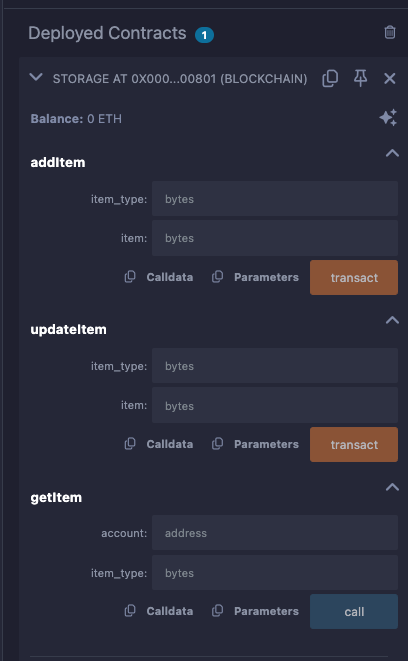 ### 5. Interact with the Functions
#### addItem
* **Parameters:**
* `item_type`: Bytes representing the type of item to add.
* `item`: Bytes representing the item data to be added.
* **Behavior:** Adds a new item to the storage.
* **Result:**
* Verify the transaction in MetaMask or Remix.
* Confirm the **ItemAdded** event appears in the Remix terminal.
#### updateItem
* **Parameters:**
* `item_type`: Bytes representing the type of item to update.
* `item`: Bytes representing the new item data.
* **Behavior:** Updates an existing item in the storage.
* **Result:**
* Verify the transaction in MetaMask or Remix.
* Confirm the **ItemUpdated** event appears in the Remix terminal.
#### getItem
* **Parameters:**
* `account`: Address of the account whose item you want to retrieve.
* `item_type`: Bytes representing the type of item to retrieve.
* **Behavior:** Reads an item stored in the contract.
* **Result:**
* The retrieved data is returned as bytes.
* Verify the data in the Remix terminal.
#### deleteItem
Coming in next runtime upgrade.
### 5. Interact with the Functions
#### addItem
* **Parameters:**
* `item_type`: Bytes representing the type of item to add.
* `item`: Bytes representing the item data to be added.
* **Behavior:** Adds a new item to the storage.
* **Result:**
* Verify the transaction in MetaMask or Remix.
* Confirm the **ItemAdded** event appears in the Remix terminal.
#### updateItem
* **Parameters:**
* `item_type`: Bytes representing the type of item to update.
* `item`: Bytes representing the new item data.
* **Behavior:** Updates an existing item in the storage.
* **Result:**
* Verify the transaction in MetaMask or Remix.
* Confirm the **ItemUpdated** event appears in the Remix terminal.
#### getItem
* **Parameters:**
* `account`: Address of the account whose item you want to retrieve.
* `item_type`: Bytes representing the type of item to retrieve.
* **Behavior:** Reads an item stored in the contract.
* **Result:**
* The retrieved data is returned as bytes.
* Verify the data in the Remix terminal.
#### deleteItem
Coming in next runtime upgrade.
For more exhaustive definitions please look at the [Storage Operations](/peaqchain/sdk-reference/javascript/storage-operations) in the SDK.