> ## Documentation Index
> Fetch the complete documentation index at: https://docs.peaq.xyz/llms.txt
> Use this file to discover all available pages before exploring further.
# RBAC
This guide provides a walkthrough for interacting with the peaq **RBAC** (role-based access control) precompile. Applicable to all peaq networks.
The RBAC precompile is integrated into our JavaScript SDK, serving as the underlying mechanism that triggers the corresponding substrate extrinsic.
## Prerequisites
* Basic understanding of blockchain, EVM, and RBAC concepts.
* Using the Remix IDE with MetaMask configured to interact with a peaq network.
* You have token funds available in the wallet connected to the a peaq network.
## Instructions
### 1. Setup Remix IDE
* Open the [Remix website](https://remix.ethereum.org/).
* Create a new blank workspace for the precompiles.
### 2. Create a New File
* In your Remix workspace, create a new file named `rbac.sol`.
* Copy the content of the rbac precompile file from the peaq network node precompile page and paste it into the `rbac.sol` file. The precompile is found at
the [peaq node source code.](https://github.com/peaqnetwork/peaq-network-node/blob/dev/precompiles/peaq-rbac/rbac.sol)
### 3. Compile the Contract
* Compile the `rbac.sol` file by clicking on the **Solidity Compiler** tab and selecting the appropriate compiler version.
* Ensure the compilation is successful and generates the ABI file needed for interacting with the smart contract.
### 4. Deploy and Interact with the Contract
1. Under the **Deploy and Run Transactions** tab, select **Injected Provider - MetaMask** as the environment.
2. Ensure your chain ID matches the selected network (peaq/agung).
3. Choose the account with sufficient token funds.
4. Set the contract address to `0x0000000000000000000000000000000000000802`.
5. Click **At Address** to load the deployed contract into the interface.
On the bottom left your the Remix interface you will get the following functions you can interact with:
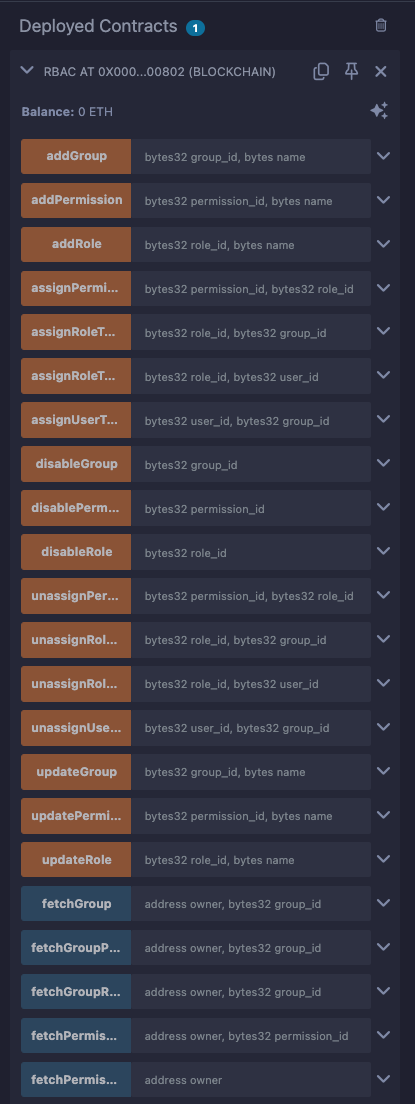 ### 5. Interact with the Functions
The RBAC smart contract provides extensive role-based access management capabilities. Below are some key functions categorized by their purpose:
#### Role Management
1. **addRole**
* **Parameters:**
* `role_id`: A unique identifier for the role.
* `name`: Bytes representing the name of the role.
* **Behavior:** Adds a new role to the system.
* **Result:**
* Verify the transaction in MetaMask or Remix.
* Confirm the **RoleAdded** event in the Remix terminal.
2. **updateRole**
* **Parameters:**
* `role_id`: Identifier of the role to update.
* `name`: Updated name in bytes.
* **Behavior:** Updates an existing role.
* **Result:**
* Verify the transaction in MetaMask or Remix.
* Confirm the **RoleUpdated** event in the Remix terminal.
3. **disableRole**
* **Parameters:**
* `role_id`: Identifier of the role to disable.
* **Behavior:** Disables an existing role.
* **Result:**
* Verify the transaction in MetaMask or Remix.
* Confirm the **RoleRemoved** event in the Remix terminal.
#### Permission Management
1. **addPermission**
* **Parameters:**
* `permission_id`: A unique identifier for the permission.
* `name`: Bytes representing the name of the permission.
* **Behavior:** Adds a new permission.
* **Result:**
* Verify the transaction in MetaMask or Remix.
* Confirm the **PermissionAdded** event in the Remix terminal.
2. **assignPermissionToRole**
* **Parameters:**
* `permission_id`: Identifier of the permission.
* `role_id`: Identifier of the role.
* **Behavior:** Assigns a permission to a role.
* **Result:**
* Verify the transaction in MetaMask or Remix.
* Confirm the **PermissionAssigned** event in the Remix terminal.
#### Group Management
1. **addGroup**
* **Parameters:**
* `group_id`: A unique identifier for the group.
* `name`: Bytes representing the group name.
* **Behavior:** Adds a new group to the system.
* **Result:**
* Verify the transaction in MetaMask or Remix.
* Confirm the **GroupAdded** event in the Remix terminal.
2. **assignUserToGroup**
* **Parameters:**
* `user_id`: Identifier of the user.
* `group_id`: Identifier of the group.
* **Behavior:** Assigns a user to a group.
* **Result:**
* Verify the transaction in MetaMask or Remix.
* Confirm the **UserAssignedToGroup** event in the Remix terminal.
After getting an understanding of these key functions, feel free to interact with the RBAC controls that were not mentioned in this document.
### 5. Interact with the Functions
The RBAC smart contract provides extensive role-based access management capabilities. Below are some key functions categorized by their purpose:
#### Role Management
1. **addRole**
* **Parameters:**
* `role_id`: A unique identifier for the role.
* `name`: Bytes representing the name of the role.
* **Behavior:** Adds a new role to the system.
* **Result:**
* Verify the transaction in MetaMask or Remix.
* Confirm the **RoleAdded** event in the Remix terminal.
2. **updateRole**
* **Parameters:**
* `role_id`: Identifier of the role to update.
* `name`: Updated name in bytes.
* **Behavior:** Updates an existing role.
* **Result:**
* Verify the transaction in MetaMask or Remix.
* Confirm the **RoleUpdated** event in the Remix terminal.
3. **disableRole**
* **Parameters:**
* `role_id`: Identifier of the role to disable.
* **Behavior:** Disables an existing role.
* **Result:**
* Verify the transaction in MetaMask or Remix.
* Confirm the **RoleRemoved** event in the Remix terminal.
#### Permission Management
1. **addPermission**
* **Parameters:**
* `permission_id`: A unique identifier for the permission.
* `name`: Bytes representing the name of the permission.
* **Behavior:** Adds a new permission.
* **Result:**
* Verify the transaction in MetaMask or Remix.
* Confirm the **PermissionAdded** event in the Remix terminal.
2. **assignPermissionToRole**
* **Parameters:**
* `permission_id`: Identifier of the permission.
* `role_id`: Identifier of the role.
* **Behavior:** Assigns a permission to a role.
* **Result:**
* Verify the transaction in MetaMask or Remix.
* Confirm the **PermissionAssigned** event in the Remix terminal.
#### Group Management
1. **addGroup**
* **Parameters:**
* `group_id`: A unique identifier for the group.
* `name`: Bytes representing the group name.
* **Behavior:** Adds a new group to the system.
* **Result:**
* Verify the transaction in MetaMask or Remix.
* Confirm the **GroupAdded** event in the Remix terminal.
2. **assignUserToGroup**
* **Parameters:**
* `user_id`: Identifier of the user.
* `group_id`: Identifier of the group.
* **Behavior:** Assigns a user to a group.
* **Result:**
* Verify the transaction in MetaMask or Remix.
* Confirm the **UserAssignedToGroup** event in the Remix terminal.
After getting an understanding of these key functions, feel free to interact with the RBAC controls that were not mentioned in this document.
For more exhaustive definitions please look at the [RBAC Operations](/peaqchain/sdk-reference/javascript/rbac-operations) in the SDK.