> ## Documentation Index
> Fetch the complete documentation index at: https://docs.peaq.xyz/llms.txt
> Use this file to discover all available pages before exploring further.
# Generate Session Key
## Generate the key
1. Make the request from your **VM** (where your validator node container is running) using the following command:
```bash theme={"theme":{"light":"github-light-default","dark":"github-dark"}}
curl -X 'POST' \
-H "Content-Type: application/json" \
-d '{"id":1, "jsonrpc":"2.0", "method": "author_rotateKeys", "params":[]}' http://localhost:9944
```
2. Copy the **key** from the response:
```bash theme={"theme":{"light":"github-light-default","dark":"github-dark"}}
{"jsonrpc":"2.0","result":"0xf22d82cfcf4402990a0bef3abefd1e58217ff3a86c548d30f1495fd529460d76","id":1}
```
3. In this case, the **key** is:
```bash theme={"theme":{"light":"github-light-default","dark":"github-dark"}}
"0xf22d82cfcf4402990a0bef3abefd1e58217ff3a86c548d30f1495fd529460d76"
```
## Associate your session key with your validator account
Open the **Developer** tab, and click **Extrinsics**, there you'll need to submit the following extrinsic:
`Developer → Extrinsics → session → setKeys(keys, proof)`
You can use any peaq endpoint to submit `setKeys` extrinsic, including the endpoint from your VM with validator node.
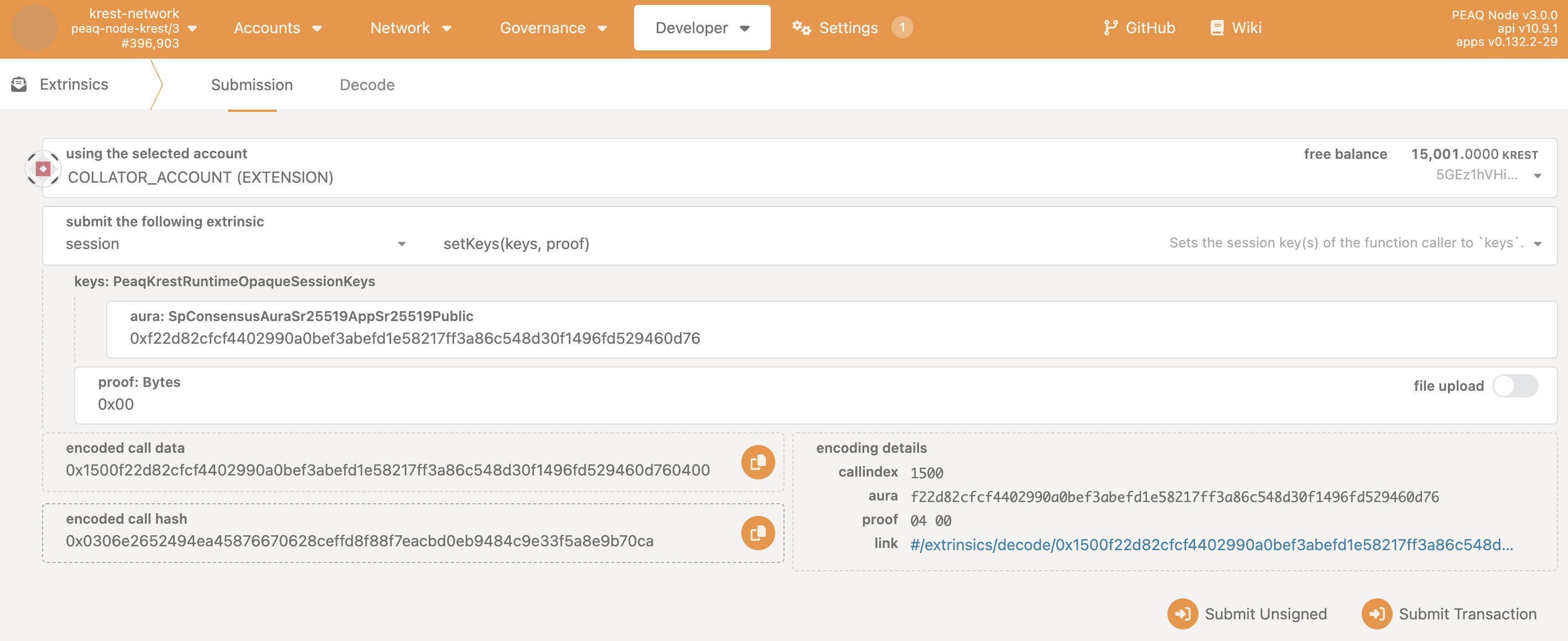 1. Paste your session key into the `aura: SpConsensusAuraSr25519AppSr25519Public field`
2. Paste 0x00 into the field `proof: Bytes`
3. Click `Submit Transaction`
After using setKeys extrinsic, you can connect back to the public endpoint.
### Double-check that your session key is associated with your wallet address
Open the **Developer** tab, and click **Chain state**. There, you'll need to submit the following state query:
`Developer → Chain state → Session → nextKeys[AccountId32]`
1. Paste your session key into the `aura: SpConsensusAuraSr25519AppSr25519Public field`
2. Paste 0x00 into the field `proof: Bytes`
3. Click `Submit Transaction`
After using setKeys extrinsic, you can connect back to the public endpoint.
### Double-check that your session key is associated with your wallet address
Open the **Developer** tab, and click **Chain state**. There, you'll need to submit the following state query:
`Developer → Chain state → Session → nextKeys[AccountId32]`
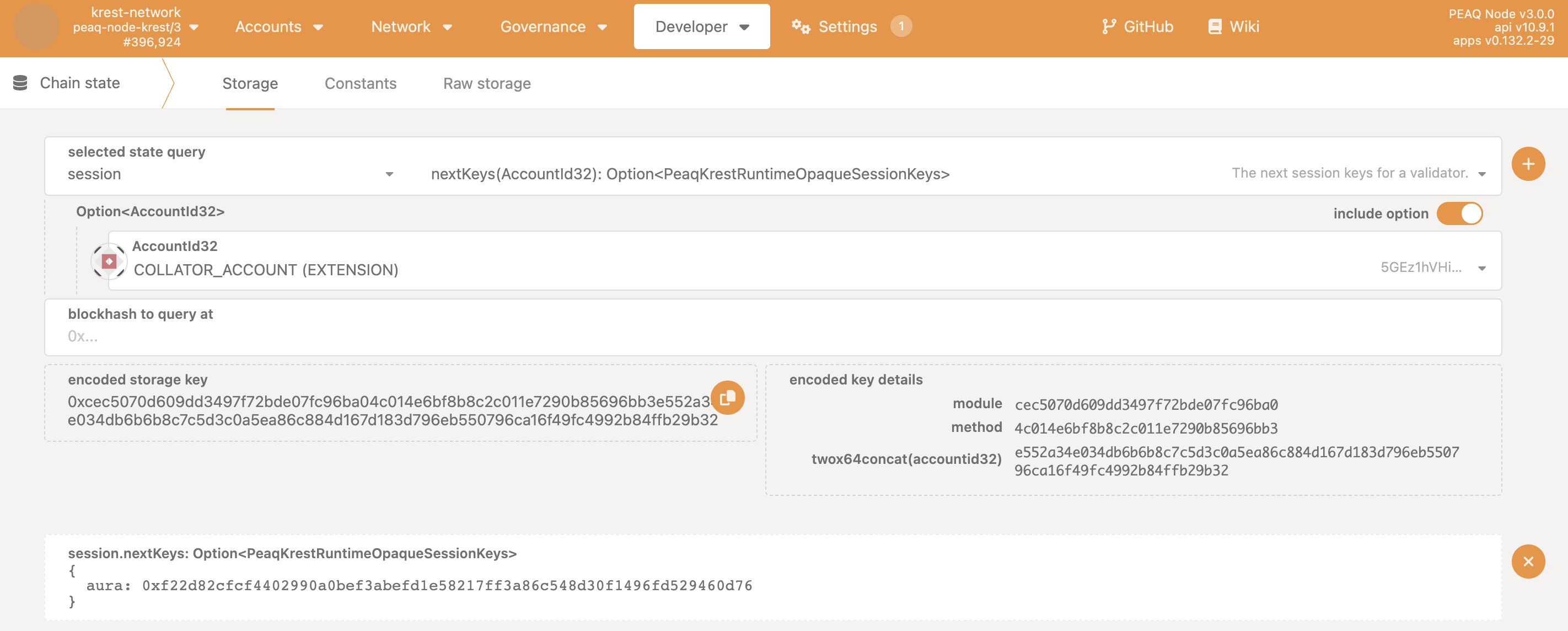 1. Toggle the switch `include option` and select your validator address in the `AccountId32` field.
2. Click the `+` button.
3. Confirm that your key is displayed.
## Remove unsafe rpc methods from your node
Remove `--unsafe-rpc-external` and `--rpc-methods=unsafe` methods, which we needed in the beginning, and rerun the container.
```bash theme={"theme":{"light":"github-light-default","dark":"github-dark"}}
sudo docker run -d -v peaq-storage:/chain-data -p 9944:9944 peaq/parachain:peaq-v0.0.105 \
--collator \
--parachain-id 3338 \
--chain ./node/src/chain-specs/peaq-raw.json \
--base-path chain-data \
--port 30333 \
--rpc-port 9944 \
--rpc-cors=all \
--execution=wasm \
--out-peers 50 \
--in-peers 50 \
-- \
--execution wasm \
--port 30343 \
--sync fast \
--rpc-port 9977
```
1. Toggle the switch `include option` and select your validator address in the `AccountId32` field.
2. Click the `+` button.
3. Confirm that your key is displayed.
## Remove unsafe rpc methods from your node
Remove `--unsafe-rpc-external` and `--rpc-methods=unsafe` methods, which we needed in the beginning, and rerun the container.
```bash theme={"theme":{"light":"github-light-default","dark":"github-dark"}}
sudo docker run -d -v peaq-storage:/chain-data -p 9944:9944 peaq/parachain:peaq-v0.0.105 \
--collator \
--parachain-id 3338 \
--chain ./node/src/chain-specs/peaq-raw.json \
--base-path chain-data \
--port 30333 \
--rpc-port 9944 \
--rpc-cors=all \
--execution=wasm \
--out-peers 50 \
--in-peers 50 \
-- \
--execution wasm \
--port 30343 \
--sync fast \
--rpc-port 9977
```