> ## Documentation Index
> Fetch the complete documentation index at: https://docs.peaq.xyz/llms.txt
> Use this file to discover all available pages before exploring further.
# Join Delegator Set
## Join the Delegator Set
Open the **Developer** tab, and click **Extrinsics**. There, you'll need to submit the extrinsic with the collator of choice and your stake:
`Developer → Extrinsics → Submission → parachainStaking → joinDelegators(collator, amount)`
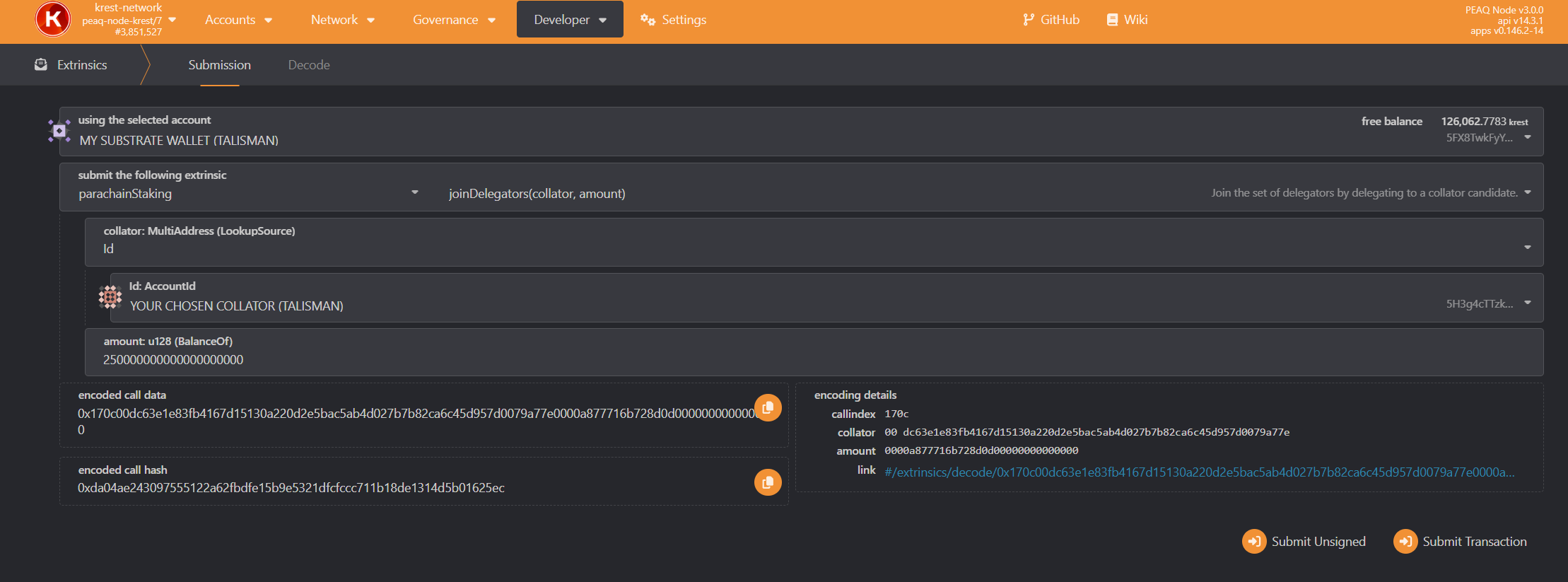 1. Select `Id` in the dropdown list in the field `collator: MultiAddress (LookupSource)`.
2. Paste the `Id` (which you copied during the previous step) to the `Id:AccountId` field.
3. Enter the staking amount to the `amount: u128 (BalanceOf)` field.
* Keep in mind that peaq has 18 decimals, so if you want to stake 250 tokens you'll need to enter `250000000000000000000`.
* The min stake amount for the delegator is `100 $PEAQ`.
* 1 collator can be backed up by `100` delegators max.
4. Click `Submit Transaction`
1. Select `Id` in the dropdown list in the field `collator: MultiAddress (LookupSource)`.
2. Paste the `Id` (which you copied during the previous step) to the `Id:AccountId` field.
3. Enter the staking amount to the `amount: u128 (BalanceOf)` field.
* Keep in mind that peaq has 18 decimals, so if you want to stake 250 tokens you'll need to enter `250000000000000000000`.
* The min stake amount for the delegator is `100 $PEAQ`.
* 1 collator can be backed up by `100` delegators max.
4. Click `Submit Transaction`